


AI product design refers to the use of artificial intelligence tools and technologies throughout the process of creating digital products. This usage ranges from research and ideation to prototyping, interface design, and testing.
Rather than replacing your designers, use AI as a collaborative layer in product design. This way, you can speed up repetitive tasks, extract data-driven insights, and expand creative options at every stage.
This shift isn’t limited to large tech companies with dedicated AI teams. Small in-house design teams and freelance product designers now use the same tools, often through simple Figma plug-ins or browser extensions. This has lowered the barrier to entry even as the underlying models keep improving.
Design teams are increasingly using AI tools in the product design process to move faster without sacrificing quality or user-centered thinking. In this article, we will break down what AI product design means in practice, where it delivers the most value, and how it fits alongside traditional design expertise.
What Is AI Product Design?
AI product design uses machine learning, natural language processing, and generative AI to support decisions that were once made manually. Decisions include synthesizing research, drafting layouts, and generating prototypes. It doesn’t replace a designer’s judgment. It shortens the time between an idea and a testable version of it, expanding the role of AI in product design workflows with every release cycle.
A lot of surveys found that accessibility checks, design-system compliance, and repetitive resizing tasks are where design teams lean on AI most, ahead of pure idea generation. That pattern suggests AI-powered product design tools currently earn the most trust on well-defined, rule-based tasks rather than open-ended creative decisions.
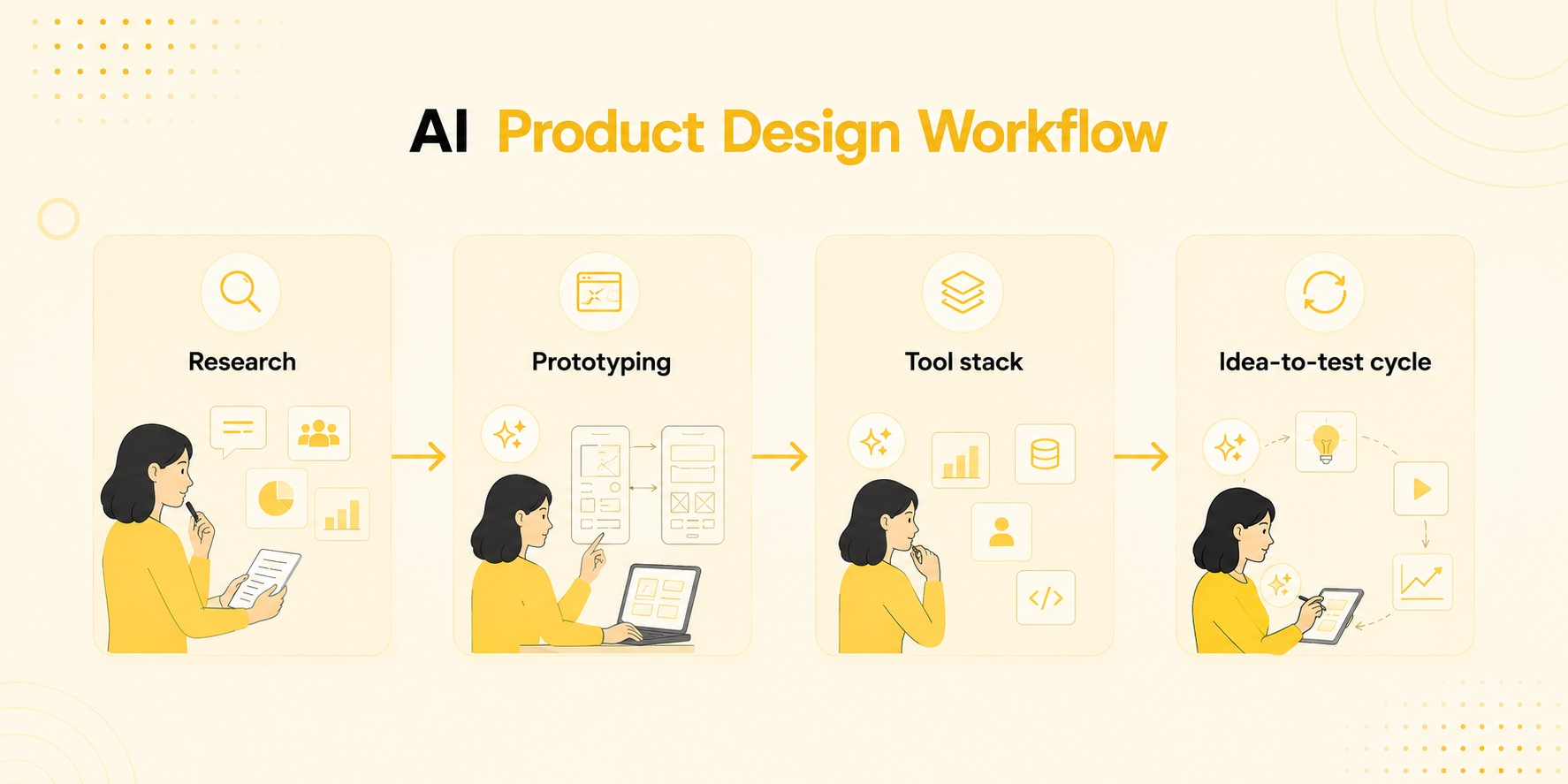
| Stage | Traditional Workflow | AI-Powered Workflow |
| Research | Designers manually review interviews, notes, and past reports to extract insights | An AI agent pulls from the research repository and returns data-backed answers instantly |
| Prototyping | High-fidelity prototypes typically take about two weeks to build | Vibe-coded prototypes can be completed in hours using tools like Claude Code |
| Tool stack | Centered on one primary tool (commonly Figma), averaging around 3 tools per designer | Designers now use an average of 7 AI tools, spanning ideation, coding, and QA |
| Idea-to-test cycle | Linear process: concept, review, build, test, repeat | Collapsed cycle: designers can move from idea to a testable build in a single session |
Benefits and Limitations of AI for Product Design
AI’s promise in product design is real, but it isn’t unconditional. The technology excels at speed, volume, and repetition, while still depending on human oversight for accuracy, nuance, and judgment.
Here’s a practical breakdown of where AI product design tools help most, and where their limits still need a designer’s attention.
✅ Benefits:
- Faster workflows: AI compresses first-draft design cycles by 40–60%, turning multi-week concept phases into a matter of days across real design teams (Fora Soft).
- Idea generation: Generative AI for product development produces multiple concept directions in minutes, widening the pool of ideas before designers manually refine the strongest options.
- Automation: AI design automation handles repetitive tasks, such as resizing, tagging, and asset variations. This frees up designers’ time to focus on strategy instead of production busywork.
- Consistency: AI applies design-system rules uniformly across screens, catching spacing or color-token deviations that are easy to miss manually at scale.
- Lower barrier to entry: Non-designers like PMs and founders can draft functional layouts without waiting on a designer’s calendar, speeding up early scoping work.
- Faster documentation: AI can auto-generate design specs and component notes for developers, cutting down the back-and-forth that usually happens during handoff.
❌ Limitations:
- Human oversight: Every AI-generated concept still needs a human review step. Teams should not over-trust confident but inaccurate outputs without a verification checkpoint.
- Accuracy: AI models sometimes misread research context or brand nuance. This can lead to designs that look polished but miss the actual user problem entirely.
- Creative control: Leaning too heavily on AI-enabled product development can flatten originality if teams treat generated outputs as final rather than starting points.
- Tool fragmentation: Managing several AI tools at once, averaging seven per designer, adds real workflow overhead and a steep learning curve for teams.
- Bias risk: Models trained on limited datasets can skew defaults toward certain demographics or interface conventions. This requires deliberate correction from the design team.
- IP and licensing uncertainty: Content generated by tools trained on public data can raise ownership questions, particularly for client-facing brand assets and logos.
AI Product Design Across Different Areas of the Design Process + Tools
AI now touches nearly every stage of the product design process, though outputs and reliability vary by task. From early research to final testing, integrating AI into the process means matching the right AI tool/assistant to each specific job. Please do not apply one universal tool everywhere.
User Research and UX Strategy
User research is where AI delivers some of the clearest early gains, mainly by shrinking the gap between raw data and actionable insight.
Using Dovetail, you can auto-code interview transcripts and cluster themes across studies. With Maze, you can run AI-moderated usability tests directly on prototypes and flags friction points automatically. UserTesting can help you add a video layer, condensing unfiltered user reactions into shareable highlight reels for stakeholders.
In fact, 69% of researchers now use AI in at least part of their process, a 19-point jump from the previous year (Maze Future of User Research Report). That shift signals AI product design research has moved from novelty to a baseline expectation on research teams.
Teams building a broader AI for UX design strategy get the most value by pairing these tools with human interpretation. AI surfaces the “what” fast, but researchers still need to judge the “why” and translate it into roadmap decisions.
Product Ideation
Product ideation moves faster when AI expands the raw material teams work with, not when it replaces judgment on which ideas matter. This is where intelligent product design begins, widening the pool of concepts before narrowing it down to what’s worth building.
| Tool | Best For | What It Does |
| ChatPRD | Solo concept generation | Turns a single-sentence idea into structured product directions, feature lists, and full PRD drafts. It also incorporates user stories and scope. Success metrics are built in. |
| Miro AI | Team ideation sessions | Clusters sticky notes, generates mind maps, and synthesizes themes across a shared board |
| FigJam AI | In-tool brainstorming | Generates diagrams and idea clusters directly inside the design file, keeping ideation and execution in one place |
These tools turn a blank page into a list of ideas that you can get started with, the harder work of choosing still belongs to the team.
Wireframing and Prototyping
Wireframing and prototyping show some of the biggest time savings in artificial intelligence product design. Using AI, you can turn a blank canvas into a clickable draft in minutes instead of days.
- Figma AI (First Draft): Generates editable wireframes or mid-fidelity screens from a text prompt directly inside the Figma canvas.
- Uizard: Converts hand-drawn sketches or screenshots into digital, prompt-editable wireframes, built for non-designers and PMs.
- Visily: Turns screenshots or reference images into wireframes that you can export to Figma in under a minute. Visily is quite popular for competitive teardowns.
This should be a reminder that faster AI output doesn’t mean skipping straight to polished mockups. AI drafts still need a designer’s pass for accessibility, spacing, and edge cases before reaching dev handoff.
Interface Design
Interface design is where AI-powered product design tools start handling real component logic instead of static mockups. Galileo AI generates full UI screens (dashboards, forms, onboarding flows) directly from a text description, complete with proper layer hierarchy ready for Figma.
Anima then bridges the gap to development, converting finished Figma frames into clean React or HTML code while preserving design tokens and spacing rules, so nothing breaks during handoff.
Together, Galileo AI and Anima cut the back-and-forth between design and engineering. However, you (a human) still need to check that generated components follow accessibility standards and don’t drift from the existing design system.
Visual Design
Visual design covers the branding layer, which includes color, imagery, illustration, and iconography. This is the layer where you can let the generative models do the heavy lifting. Teams exploring AI for graphic design typically lean on a mix of tools rather than one all-purpose generator.
- Adobe Firefly: Generates on-brand images and vector patterns trained on licensed content, with generative fill for quick edits inside existing layouts.
- Midjourney: Produces highly stylized concept art and mood boards, useful for exploring visual direction before locking a brand system.
- Recraft: Generates consistent vector icons, illustrations, and brand assets in a fixed style, well-suited for scaling a design system.
As with other AI product design tools, the output still needs a designer’s eye to catch off-brand color drift or inconsistent styling.
Book a Call
Website Design and Creation
Website design and creation is the one design stage where AI has moved furthest from “assistant” toward “builder.” Prompt-based platforms now generate a live, editable site structure in minutes rather than a static mockup that still needs to be built.
In fact, by mid-2025, 35% of newly published websites were AI-generated or AI-assisted, with 17.6% built entirely by AI. That number is up from essentially zero before ChatGPT’s 2022 launch, suggesting prompt-based site generation is becoming the default starting point, not a niche shortcut.
| Tool | Best For | What It Does |
| Framer AI | Marketing sites and landing pages | Generates a full responsive site from a text prompt, with real code underneath instead of a locked template |
| Webflow AI | Teams needing CMS-driven sites | Builds page structure and content blocks from a prompt while keeping full visual-editor control over styling |
| Wix Studio | Small teams and freelancers | Uses AI to assemble layout, copy, and imagery together, aimed at speed over deep customization |
For a deeper breakdown of platforms and pricing, this comparison of AI website builders covers the trade-offs in more detail.
Testing and Optimization
Testing and optimization close the loop, catching what research and intuition miss before a product ships.
| Tool | Best For | What It Does |
| Attention Insight | Pre-launch attention prediction | Simulates eye-tracking on a design before launch, predicting which elements users notice first and which get ignored entirely |
| VWO Copilot | Post-launch A/B testing | Generates test hypotheses from real behavioral data, drafts variant copy, and flags which experiments are statistically worth running longer |
| Hotjar AI | Session and survey analysis | Clusters session recordings by frustration signals, summarizes 15-minute recordings in seconds, and builds surveys from a plain-language research goal |
| PostHog AI | Experiment setup and feature rollouts | Creates fully configured A/B tests and multivariate feature flags from a natural-language description, cutting setup time from manual configuration to seconds |
Together, they turn testing from a one-time checkpoint into a continuous feedback loop. This is where using AI for product design pays off the most, since every fix is grounded in actual user behavior rather than a guess.
How to Choose the Right AI Product Design Tools for Your Team
Picking the right AI tools comes down to four practical filters: cost structure, data handling, learning curve, and how well a tool fits your existing stack.
A tool that plugs into Figma or your current design system creates less friction than one requiring a separate workflow. Before adopting anything for client work, check where your data goes.
Some platforms train on user inputs by default, which matters for confidentiality. The learning curve matters too: a tool that takes a week to master rarely earns its place if a simpler option delivers most of the value in a day.
When integrating AI into the product design process, prioritize tools your team will actually keep using after the novelty fades.
Data Privacy and IP Considerations
Feeding client research, brand assets, or proprietary specs into AI tools carries real risk if you skip the fine print. Many platforms use uploaded content to train future models unless you opt out, which can expose confidential product plans.
Ownership of AI-generated visuals is also murky. Some jurisdictions don’t recognize copyright for outputs with no meaningful human authorship, complicating client handoffs.
Before rolling out any tool for paid work, confirm its data-retention policy, check for enterprise or opt-out tiers, and get explicit client sign-off on which assets can touch third-party models. Teams focused on AI-enabled product development should treat this as a standard step, not an afterthought.
How to Integrate AI Tools While Keeping the Human Touch in Product Design
Knowing how to use AI for product design well comes down to sequencing: let AI handle pattern recognition and repetitive generation, then hand strategic calls back to humans.
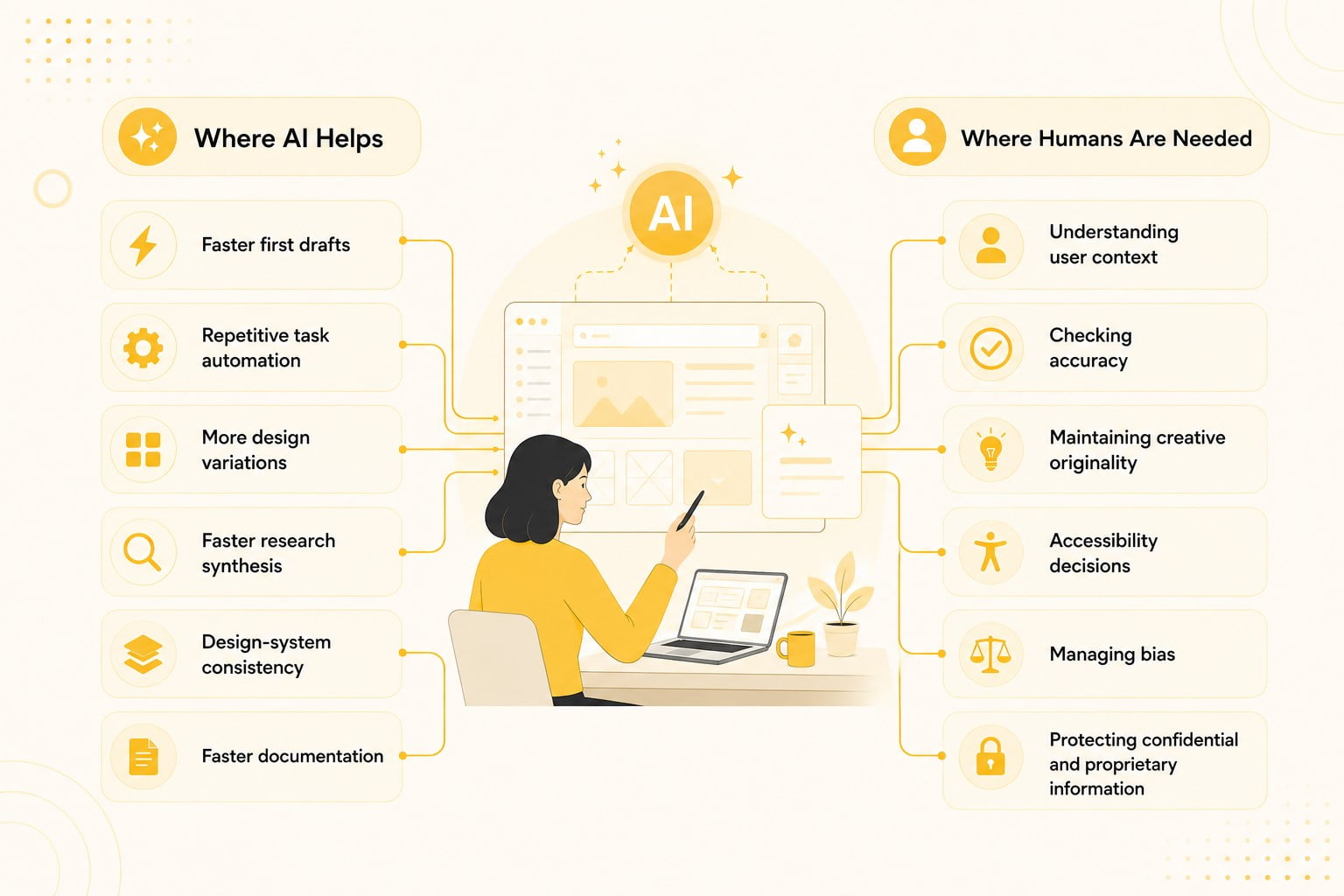
AI can draft ten wireframe variations in the time it takes a person to sketch one, but it can’t sit with a frustrated user during an interview or read the tension in a stakeholder meeting. The strongest teams treat AI product design as augmentation, not a replacement for judgment.
A practical split is to use AI for research synthesis, first-draft layouts, and content generation, while humans keep the role of AI in product design workflows pointed toward decisions that need empathy and context. This includes accessibility trade-offs, pricing calls, and brand voice. Skip that human layer, and AI-generated experiences start feeling generic fast.
Conclusion
AI product design has moved from experimental to standard practice, touching every stage from research to testing, with tools that compress timelines and automate repetitive work.
Human judgment still matters most: AI for product design works best as augmentation, not replacement. Teams getting the most from artificial intelligence product design treat it as one part of a broader toolkit.
As AI-enabled product development matures, results will depend on how well teams balance speed with judgment.