



- AI expands useful design options without replacing professional judgment.
- Clear constraints make generated directions more relevant to project goals.
- Automation is most effective for exploration and repeatable production tasks.
- Generated interfaces still require usability, accessibility, and brand validation.
- Faster generation increases the need for structured human evaluation.
AI for web design uses artificial intelligence to accelerate research, exploration, production, and evaluation throughout the website workflow. It can generate alternatives quickly, but speed alone does not create a useful website. Effective results depend on strong inputs, deliberate constraints, and informed human decisions.
The practical shift is from creating every artifact manually toward directing, comparing, and refining machine-generated possibilities. Designers still determine what serves users, supports business goals, and represents the brand accurately. AI becomes most valuable when it expands useful choices without taking ownership of those decisions.
What Is AI Web Design?
AI web design integrates artificial intelligence into tasks involved in planning, designing, building, and improving websites. Unlike traditional workflows, it can generate or analyze design material from instructions, references, and existing project information. Designers then evaluate those outputs against user needs, brand requirements, and technical constraints.
Traditional production usually moves from research toward concepts before progressively increasing visual fidelity. AI-powered web design can compress individual steps by producing alternatives almost instantly. However, the fundamental website design process still requires discovery, structural decisions, refinement, and validation.
Before using AI for a web design task, check whether:
- The outcome is verifiable: You can judge the result against clear project requirements.
- Alternatives add value: Multiple outputs would improve the decision rather than create unnecessary review.
- Errors are reversible: Weak output can be corrected before affecting users or development.
- Context can be supplied: The system receives enough project information to produce relevant material.
- Human review is available: A designer can approve the result before it influences later decisions.
AI-generated output is an intermediate artifact rather than a finished solution. Its role changes across planning, production, and evaluation. Recognizing that distinction prevents preliminary material from being mistaken for completed design work.
What Makes AI Web Design Effective?
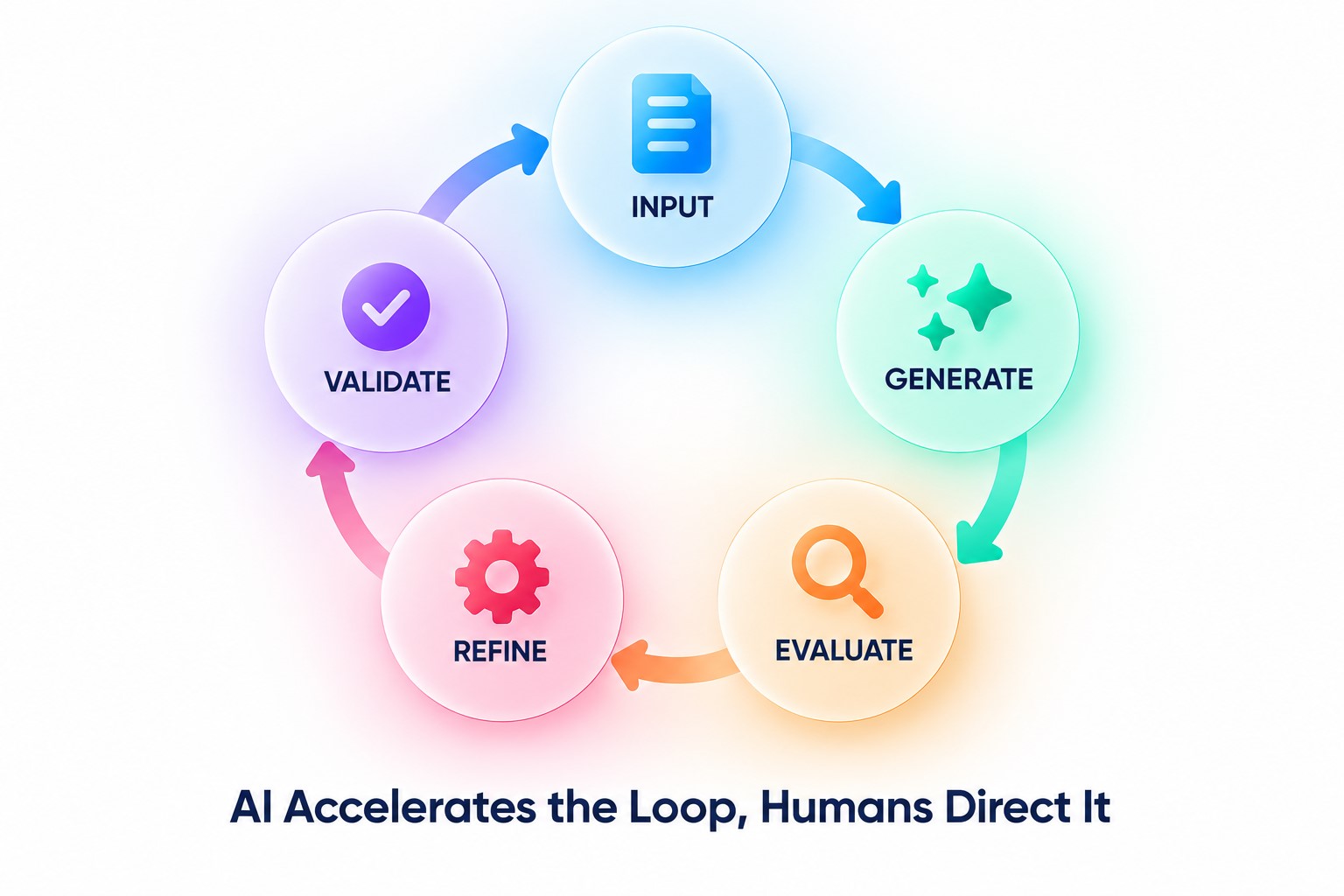
Effective AI web design combines clear constraints with informed evaluation. Strong inputs narrow the solution space around the actual problem. Human review determines whether generated ideas support the website’s purpose.
A vague request such as “design a modern homepage” leaves important decisions unresolved. A stronger brief defines audience needs, desired actions, content priorities, and functional constraints. This specificity removes irrelevant directions before generation begins.
Quality also depends on whether the output remains connected to real project evidence. Attractive interfaces can still fail when navigation obscures priorities or generated content misrepresents user intent. AI for website design works better when outputs are treated as hypotheses requiring evaluation.
Four conditions separate productive assistance from uncontrolled generation:
- Relevant context: Give the system information directly connected to the design problem.
- Explicit constraints: Define requirements that generated alternatives must respect.
- Useful variation: Generate distinct directions rather than cosmetic versions of one answer.
- Human validation: Review every important decision against evidence and project objectives.
Prompting should not become the entire methodology. References, brand assets, and structured requirements provide richer guidance than text alone. Combining these inputs can also expose contradictions hidden by a text-only prompt.
Established web design principles provide another necessary filter. Hierarchy, responsiveness, accessibility, and clarity remain relevant regardless of how an interface was generated. Automation changes production methods, not the criteria defining a successful experience.
What Determines AI Output Quality?
The following framework helps distinguish inputs that merely produce something from inputs capable of supporting useful design decisions.
| Input | Weak Approach | Effective Approach | Human Check |
| Audience | Broad demographic | Specific needs and behaviors | Does evidence support them? |
| Goal | “Make it engaging” | Define the desired user action | Is the hierarchy aligned? |
| Brand | Generic style words | Visual rules and references | Does it feel distinctive? |
| Content | Placeholder copy | Realistic information structure | Does content fit naturally? |
| Constraints | None | Functional and technical limits | Can the concept be implemented? |
Effective AI for web design therefore depends less on generation volume than on decision quality. Ten weak alternatives do not create more value than three relevant ones. Designers need enough variation to explore the problem without creating unnecessary evaluation work.
Benefits and Limitations of AI for Web Design
AI for web design reduces repetitive production while expanding options before commitment. Problems arise when teams mistake generation for validation. Without clear evaluation criteria, faster experimentation can simply multiply weak decisions.
The strongest advantages appear in repeatable tasks. Designers can accelerate research synthesis, structural exploration, and variation. This leaves more attention for prioritization and judgment.
Before investing further in an AI-generated concept, check whether:
- The hierarchy works: Important content receives appropriate visual priority without relying on decorative polish.
- The journey remains clear: Users can identify their next action without interpreting unfamiliar interface patterns.
- The concept scales: Its structure can accommodate realistic content without breaking the intended layout.
- The direction is distinctive: Generative AI for web design has produced more than a familiar pattern with superficial variation.
- The idea merits refinement: Its strategic value justifies moving from rapid exploration into detailed production.
However, output confidence does not guarantee correctness. Generated structures can contain unsuitable assumptions or inconsistent interaction patterns. These weaknesses may remain invisible until realistic content and user journeys are applied.
Accessibility requires separate validation because visual polish can conceal interaction problems. Automation cannot verify whether interfaces work for different users. Generated results therefore need the same accessibility review as manually produced work.
Originality creates another limitation. Generic inputs can encourage familiar solutions instead of distinctive directions. Teams using AI for website design should treat brand assets and strategic context as constraints from the start.
| Area | Practical Benefit | Main Limitation | Human Responsibility |
| Research | Faster synthesis | Context can disappear | Verify interpretations |
| Ideation | More directions | Ideas can become generic | Select meaningful concepts |
| Layout | Rapid alternatives | Hierarchy may be weak | Refine structure |
| Visuals | Faster variation | Brand inconsistency | Maintain visual direction |
| Production | Less repetitive work | Hidden implementation issues | Review final output |
| Optimization | Faster analysis | Signals can be misread | Validate with real behavior |
The central trade-off is therefore straightforward. AI automation in web design can increase production capacity, but evaluation capacity must increase alongside it. Otherwise, teams simply create more material requiring correction.
How to Use AI for Web Design Across Different Stages of the Design Process
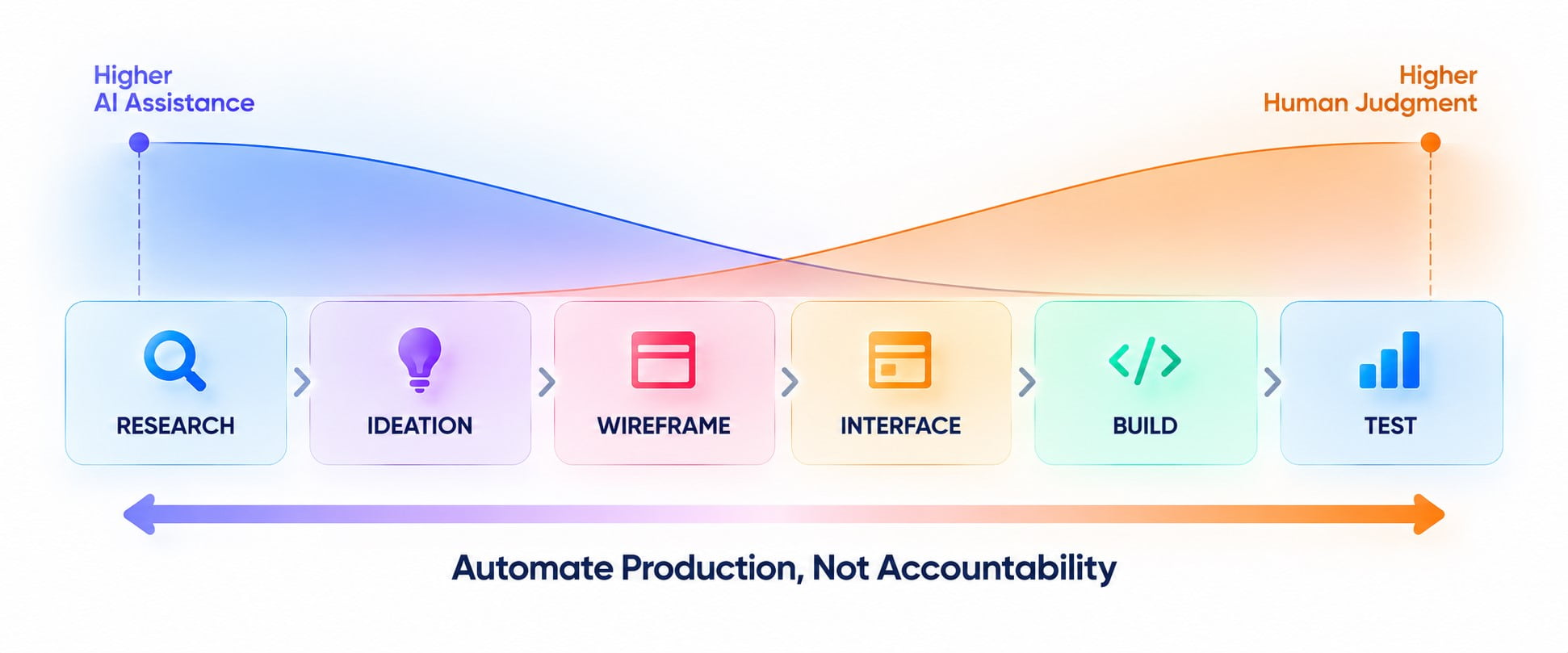
Use AI across web design by assigning it specific supporting tasks at each workflow stage. Research benefits from synthesis, ideation from variation, and production from repetitive assistance. Strategic interpretation, final selection, and validation should remain explicit human checkpoints throughout the process.
AI tools for website design should not enter every stage simply because automation is available. Map them to specific design workflow tasks where faster generation or analysis adds value. This keeps the AI-driven web design process focused on outcomes rather than tool adoption.
Website Research and Planning
AI can accelerate research synthesis without replacing discovery. It can organize interviews, analytics, observations, and secondary research into patterns. Those patterns still require verification before becoming design requirements.
This distinction matters because synthesis and discovery are not equivalent. A model can organize supplied evidence without independently proving why users behave a certain way. Research findings therefore remain inputs for judgment rather than automatic design instructions.
Before giving research material to AI, check that:
- Sources are separated: Keep different evidence types distinguishable throughout analysis.
- Context is preserved: Retain enough background to prevent isolated findings from acquiring unintended meaning.
- Sensitive data is removed: Exclude personal or confidential information unnecessary for the design task.
- Evidence is representative: Avoid treating isolated comments or unusual behaviors as established user patterns.
- Outputs remain traceable: Connect every important conclusion with its underlying research evidence.
Using AI in website design becomes more valuable when teams preserve that traceability throughout planning. Designers can distinguish evidence from generated interpretation and challenge conclusions unsupported by source material. This separation prevents convenient summaries from becoming unverified assumptions later in the workflow.
Website Ideation and Concept Development
AI can expand the solution space before teams commit to one direction. Designers can explore alternative narratives, hierarchies, and visual themes from one brief. The goal at this stage is divergence rather than selection.
Generated alternatives can also help teams challenge assumptions embedded in their first concept. Human selection remains necessary because relevance depends on project context. This division provides a practical operating principle for AI-assisted website design.
Promising concepts should then move into structured comparison. Evaluate each direction against audience relevance, differentiation, feasibility, and business intent. This turns broad exploration into an evidence-based shortlist.
Wireframing and Layout Generation
Wireframes are particularly suitable for rapid variation because their purpose is structural rather than decorative. AI can propose alternative content orders, navigation structures, section arrangements, and responsive starting points. Designers can compare those options before investing in high-fidelity execution.
Compare generated wireframes using five structural criteria:
- Priority: The primary user action receives appropriate prominence within the page hierarchy.
- Sequence: Sections appear in an order that supports the intended user journey.
- Content fit: Realistic copy fits the structure without forcing awkward layout changes.
- Navigation: Important destinations remain easy to find without unnecessary routes.
- Adaptability: The structure can accommodate different screen sizes without losing essential relationships.
Teams exploring AI website builders should also separate generation capability from design quality. Producing a functioning page does not automatically validate its information architecture. The resulting hierarchy still needs deliberate review.
Website Interface Design
Interface generation can accelerate the move from structure toward concrete screens. AI technologies for web design can suggest components, states, spacing relationships, or screen variations based on established direction. Designers remain responsible for turning these fragments into a coherent system.
Consistency becomes especially important at this stage. Buttons, forms, navigation, and repeated components should behave predictably across pages. Generated variations that ignore established patterns increase cognitive load and production debt.
Related methods from AI for UX design can support early evaluation. However, simulated analysis cannot replace observation of real users. Interface decisions still require evidence from genuine behavior.
Book a Call
Visual Design and Branding
AI for graphic design can accelerate mood exploration, asset variations, and early visual experimentation. However, brand consistency requires more than repeatedly requesting a particular style. Color, typography, imagery, composition, and tone need relationships that remain recognizable across the site.
Before approving an AI-generated visual for the website, verify that:
- Its source is clear: Confirm the asset can be used under the project’s required rights and licensing conditions.
- Its details hold up: Inspect text, anatomy, perspective, edges, and repeated elements for generation artifacts.
- Its meaning is accurate: Ensure the visual does not imply features, products, or situations the brand cannot support.
- Its format is practical: Check resolution, dimensions, file weight, and responsive cropping before implementation.
- Its role is necessary: Keep the asset only when it improves comprehension, hierarchy, or communication.
The broader AI for graphic design workflow can support asset creation beyond website interfaces. Within web projects, approved assets should then become part of a reusable visual system rather than isolated outputs.
Website Design and Creation
AI for website design can bridge the distance between approved concepts and functional pages. Depending on the workflow, systems can translate instructions into layouts, components, content structures, or implementation starting points. AI for website creation becomes most useful after important design decisions are sufficiently stable.
Teams should avoid confusing fast assembly with finished production. Responsive behavior, content states, interaction logic, performance, and maintainability still require inspection. AI-generated website design can appear complete while hiding problems outside the initial viewport.
The choice between generated foundations and bespoke execution also depends on project complexity. The comparison between custom website design vs templates illustrates why speed and control involve different trade-offs. AI does not eliminate that strategic choice.
Website Testing and Optimization
Testing is where generated assumptions encounter actual behavior. AI can help organize usability findings, classify recurring issues, summarize feedback, and propose hypotheses for further investigation. It should not declare a design successful without evidence.
Teams can also use AI to inspect consistency or flag potential problems before formal testing. These preliminary reviews work as filters that direct human attention toward suspicious areas. They are not substitutes for accessibility checks, technical validation, or representative user testing.
Apply established website design practices when evaluating the result. The origin of an interface does not change the standards it must meet. Generated pages still need clear navigation, responsive behavior, accessible interactions, and purposeful hierarchy.
A useful validation sequence is:
- Check requirements: Confirm the output still matches the approved brief.
- Inspect consistency: Find deviations across repeated interface patterns.
- Test usability: Observe whether representative users complete important tasks.
- Review accessibility: Validate structure, contrast, controls, and interaction states.
- Measure outcomes: Compare real behavior with the website’s intended goals.
Optimization should feed evidence back into the next iteration. This creates a closed AI in the web design workflow rather than a one-way generation pipeline. The team improves both the interface and the instructions guiding subsequent assistance.
Balancing AI Automation With Human Input in Web Design
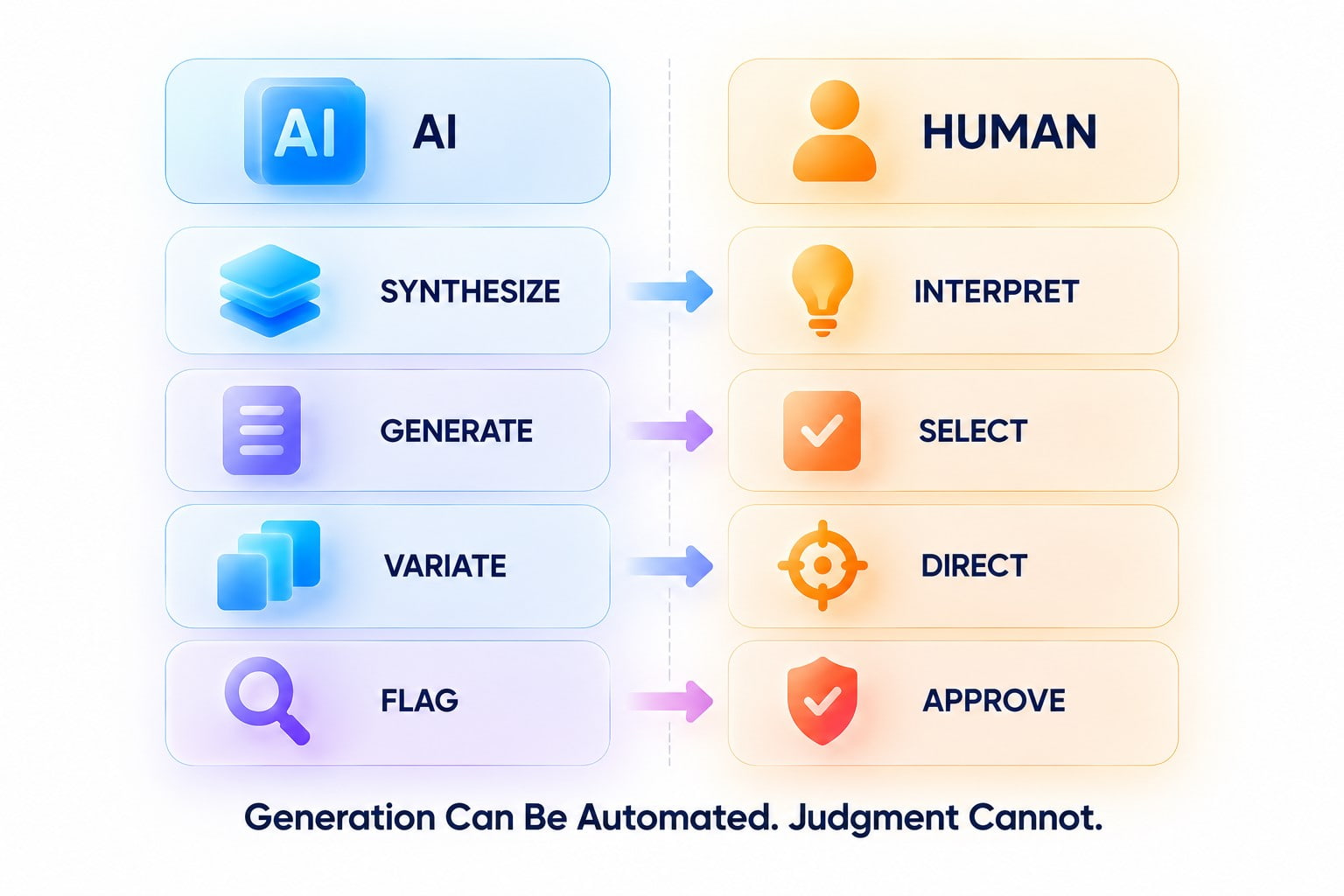
Strong AI-assisted workflows automate repeatable production without transferring decision ownership. AI can generate possibilities and process material quickly. Designers remain responsible for interpretation, creative direction, and final approval.
Analysis of AI-assisted design work highlights a related operational risk. Faster production can create more material than teams can evaluate. Review capacity must therefore grow alongside automated output.
Clear responsibility helps teams manage that risk throughout the workflow. Explicit checkpoints define what AI may produce and which decisions require human approval. The model below shows how to divide these responsibilities without surrendering decision authority.
| Decision | AI Can Support | Human Must Own |
| Research synthesis | Group and summarize evidence | Interpret user needs |
| Concept exploration | Generate alternatives | Choose strategic direction |
| Layout production | Produce variations | Approve hierarchy |
| Visual generation | Create candidate assets | Protect brand identity |
| Interface checks | Flag possible issues | Judge severity and solution |
| Optimization | Organize performance signals | Decide what changes |
Conclusion
AI for web design creates lasting value when faster production improves the quality of choices, not merely their quantity. Effective AI web design therefore requires teams to connect automation with evidence, ownership, and measurable project outcomes. The resulting workflow should make weak directions cheaper to discard and strong ones easier to develop.
Artificial intelligence in web design ultimately changes where professional effort is spent. Less time can go toward repetitive execution, while more attention moves toward consequential decisions. Success should therefore be measured by better website outcomes rather than the amount of work automated.