
AI web design tools turn text prompts, rough sketches, or existing content into editable website layouts and assets. Some generate wireframes and interface screens for designers, while others publish a finished site or produce imagery for it. A high-performing website still needs fast loading, clear structure, and a brand that feels consistent across pages.
Speed is the obvious gain of artificial intelligence in web design, but the deeper change lies elsewhere. Once AI produces a draft, teams must compare alternatives and correct its mistakes. Planning for that review makes the process more effective.
Can AI Web Design Tools Deliver the Same Quality as Designers?
AI web design tools can match professional designers on routine page layouts and visual polish. They fall behind when a site needs original positioning, complex user flows, or decisions tied to business goals. The strongest results usually come from AI drafts that a designer reviews and tests with real users.
Generated layouts do well wherever conventions are settled, as on landing pages and pricing sections. Because models reproduce patterns common across existing sites, spacing and hierarchy tend to come out clean. Teams that use AI for web design this way cut drafting time on pages where originality matters less. Here is where each side holds the edge:
| Criterion | AI Tools | Professional Designers |
| Visual quality | Clean, trend-aware layouts for common page types | Polish tailored to the brand and its audience |
| Creativity | Recombines familiar patterns from existing sites | Develops original concepts from research and positioning |
| Usability | Follows standard UX patterns without user testing | Shapes flows around user research and testing |
| Consistency | Uniform within one session, prone to drift across sessions | Maintained through design systems and review |
Across all four criteria, AI wins on familiarity and designers win on fit. A generated page is only as distinctive as the conventions it borrows, which makes it a strong start but a weak finish for a brand that must stand apart. That gap matters most on the homepage and key service pages, where looking like every other site costs trust.
Key Criteria for Evaluating AI Website Design Tools
The right AI website design tools are the ones that fit the job at hand. A wireframing assistant and a full site builder solve different problems, so comparing them feature by feature leads teams astray. Five criteria show how much practical value a tool actually adds:
| Criterion | What to Check | Practical Impact |
| Core Functionality | Which design or development tasks the tool handles | Shows whether it replaces a step or only speeds it up |
| AI Capabilities | Layout generation, prompt-based edits, and content awareness | Determines how much manual rework follows each draft |
| Pricing | Plan tiers, credit limits, and starting costs | Shapes the total cost once usage grows past a trial |
| Integrations | Links to design platforms, CMSs, and development tools | Decides whether work moves forward without rebuilding |
| Ease of Use | Fit for beginners, designers, or developers | Affects how quickly a team gets usable output |
Credit-based pricing deserves a closer look than the headline number. Many AI-powered web design tools meter every generation, so heavy iteration can drain a plan long before the month ends. Export options matter just as much, since a design locked inside one platform makes any later move expensive. Tying each tool to one stage of the website design process keeps a team from paying twice for the same site.
Start My Website Project
Best AI Tools for Website Design
AI tools for website design differ most in where they join the workflow. Wireframing assistants establish page structure before visual design begins. Website builders turn prompts into published pages. Asset generators provide custom imagery and 3D elements.
AI UI/UX & Wireframing
These AI-assisted website design tools put structure first. They suit teams that want to validate flows before paying for visuals or code. Applying AI for UX design at this stage pays off, because a layout error is cheapest to fix before development starts.
1. Uizard
📝 Overview: A founder with a napkin sketch and no design background is the user Uizard serves best. A photo of that sketch becomes an editable, clickable mockup that stakeholders can review the same afternoon. Visual polish comes later, from a designer who inherits a clear structure instead of a blank file.
⚙️ Key Features:
- Autodesigner 2.0 for text-to-screen generation
- Screenshot and wireframe scanners
- Predictive heatmaps and AI design reviews
💰 Pricing: Pro starts at $12/month and Business at $39/month, both billed annually.
🎁 Free Plan / Trial: Free plan with up to 2 projects and 3 AI generations per month.
✅ Pros:
- Theme generator borrows colors and fonts from any URL
- Brand kits keep early mockups in company colors
- Clickable flows win stakeholder buy-in early
❌ Cons:
- Only three AI generations a month on the free plan
- Output leans toward app screens over marketing pages
- Mockups need a designer’s pass before production
2. Relume
📝 Overview: Most website problems start in the sitemap, long before anyone picks a font. Relume works at that stage, turning a short business description into page structure and wireframes. Settling the architecture here spares a team a half-site redesign later.
⚙️ Key Features:
- AI sitemap and wireframe generation
- Style guide with color, type, and spacing tokens
- Specialist agents for strategy, copy, and design
💰 Pricing: Pro AI starts at $24/month, and Launch hosting costs $12 per site/month billed yearly ($16 billed monthly).
🎁 Free Plan / Trial: Free plan with enough monthly AI usage for one full website, plus a 7-day Pro AI trial.
✅ Pros:
- Generates a full sitemap from a one-line brief
- Webflow export carries wireframes into a real build
- Free Figma kit mirrors its component library
- No per-seat charge for editors
❌ Cons:
- Built for marketing sites rather than app interfaces
- Hosting is billed separately for each site
- Free sites show a badge and cap forms at 20 submissions
3. UX Pilot
📝 Overview: How do you know which of several layouts will hold a visitor’s attention? UX Pilot answers with four parallel directions per prompt and predictive heatmaps on each. Its credits drain quickly, so the tool rewards focused comparison rounds over open-ended exploration.
⚙️ Key Features:
- Low- to high-fidelity wireframe generation
- Four parallel design directions per prompt
- Figma and code export
💰 Pricing: Pro costs $19/month billed yearly ($29 billed monthly). Teams costs $31 per user/month billed yearly ($39 billed monthly).
🎁 Free Plan / Trial: Free plan with 80 daily credits and one project, no credit card needed.
✅ Pros:
- AI design reviews explain usability problems
- Predictive heatmaps flag weak attention zones
- Reads sketches, PDFs, and screenshots as input
❌ Cons:
- Figma and code export sit behind the paid plan
- Website cloner is reserved for Pro
- Long iteration sessions exhaust the credit allowance
4. Magic Patterns
📝 Overview: Handoff is where many AI prototypes lose their value, because engineers rebuild them from scratch. Magic Patterns closes that gap by generating prototypes in code on top of a team’s own components. What stakeholders click through is already close to what developers will ship.
⚙️ Key Features:
- Prompt-to-prototype generation in code
- MCP server for coding agents
- Live multiplayer collaboration
💰 Pricing: Starter costs $20/month for 1,000 shared workspace credits and Business $100/month for 5,000, both billed monthly.
🎁 Free Plan / Trial: Free tier with limited monthly credits and no credit card required.
✅ Pros:
- Engineers inherit code instead of static mockups
- Prototypes reuse the team’s own components
- GitHub sync links prototypes to the codebase
- Unlimited seats on every plan
❌ Cons:
- Not designed for publishing full websites
- Complex prompts consume more credits
- Rolled-over credits expire after one month
AI Website Builders
Full site builders apply AI for website creation end to end, from prompt to hosted site. They suit owners who need a working site quickly and can live with some limits on custom layouts. A broader review of AI website builders helps when hosting, commerce, or booking features decide the choice.
5. Wix
📝 Overview: For owners who plan to keep editing long after launch, Wix makes AI part of routine maintenance. In the Wix Harmony editor, the Aria agent redesigns pages and writes copy on request, while drag-and-drop tools handle precise adjustments. Convenience comes with lock-in, since a Wix site cannot move to another host.
⚙️ Key Features:
- Prompt-to-site generation with Wix Harmony
- Aria agent for page redesigns, copy, and images
- Built-in SEO, ecommerce, and booking tools
💰 Pricing: Light starts at $17/month billed yearly, with prices varying by location.
🎁 Free Plan / Trial: Free plan with Wix branding, plus a 14-day money-back guarantee on premium plans.
✅ Pros:
- Conversational edits suit owners without design skills
- Manual drag-and-drop control survives AI generation
- Business tools work without third-party plugins
❌ Cons:
- Site code cannot be exported to another host
- Accepting online payments needs a higher plan
- Template cannot be switched once a site is created
6. Hostinger
📝 Overview: Total cost is the clearest argument for Hostinger, which bundles hosting and email with the AI builder. The builder can rebuild an outdated site from its existing URL, which puts a low-budget relaunch within reach. Long prepaid terms keep the rate low, so the renewal price is the one to compare.
⚙️ Key Features:
- Agentic and Manual building modes
- Code editor and test environment in Agentic mode
- Built-in website localization
💰 Pricing: Premium renews at $10.99/month on a 48-month term, with introductory discounts at signup.
🎁 Free Plan / Trial: No free plan, but a 30-day money-back guarantee applies.
✅ Pros:
- Hosting, domain, and email in one subscription
- Rebuilds a site from an existing URL or PDF
- Agentic projects export as React and Vite code
❌ Cons:
- Manual-mode sites export content without layout
- The lowest rate requires a 48-month prepayment
- Premium caps an account at three websites
7. Framer
📝 Overview: Marketing teams that treat their homepage as an ongoing experiment get the most from Framer. AI drafts pages on a professional canvas, and designers keep control over breakpoints and typography. An A/B testing add-on then shows which version actually converts.
⚙️ Key Features:
- AI agent for pages, sections, and copy
- Responsive canvas with breakpoints and components
- CMS with collections and staging
💰 Pricing: Basic starts at $10/month with 1,000 AI credits and Pro at $30/month with 3,000, both billed yearly.
🎁 Free Plan / Trial: Free plan with 500 AI credits per month and a Framer domain.
✅ Pros:
- AI output lands on a full design canvas
- Figma layers paste in as editable elements
- AI translation for localized versions
❌ Cons:
- Canvas controls overwhelm non-designers at first
- Each extra editor costs $20/month
- Experiments require a paid add-on
8. 10Web
📝 Overview: An established business already has most of its website content scattered across its online profiles. 10Web gathers that material from a Google Business, Facebook, or Instagram page and turns it into a working site. The result suits owners who would rather refine a ready draft than write every page from scratch.
⚙️ Key Features:
- Site generation from social and business profiles
- Online store with checkout and inventory
- Apps with logins and member areas
💰 Pricing: AI Starter starts at $10/month per project, billed annually.
🎁 Free Plan / Trial: Free plan with one project, 15 AI credits, and 1,000 monthly visitors, plus a 3-day trial.
✅ Pros:
- Established businesses skip most manual content entry
- Pages arrive optimized for PageSpeed
- Figma designs import into live pages
❌ Cons:
- Trial sites are deleted if not upgraded within three days
- The lowest price requires annual billing
- Visitor and storage caps apply to each project
9. Durable
📝 Overview: Plumbers and consultants rarely need an award-winning layout, but every missed inquiry costs them money. Durable pairs each generated site with a CRM, online booking, and automated replies to new leads. The price is design freedom, since the platform offers little access to HTML.
⚙️ Key Features:
- Fast prompt-to-site generation
- Dru AI editor for layout and copy changes
- SEO and AI search visibility tools
💰 Pricing: Launch costs $22/month billed yearly ($25 billed monthly), and Grow $41/month billed yearly ($49 billed monthly).
🎁 Free Plan / Trial: Free plan with a website preview and 300 AI credits.
✅ Pros:
- CRM and booking ready from the first day
- Regenerate redesigns any single section in one click
- Visibility tools target AI search results
❌ Cons:
- Little access to the underlying HTML
- Ecommerce support is limited
- Free plan stays a private preview
AI Visual & Asset Creation
Visual and asset generators carry AI technologies for web design into imagery, illustration, and 3D. Every output still needs a check for resolution, style match, and usage rights before it goes live. Teams already using AI for graphic design can bring the same brand references and prompt habits to website visuals.
10. Adobe Firefly
📝 Overview: Few teams build a website without existing photography, and Adobe Firefly is strongest at adapting it. Generative Expand stretches a product shot into a wide hero banner, while Generative Fill clears distracting objects. Edits like these count as standard generations, so they never compete with video for credits.
⚙️ Key Features:
- Text-to-image and vector generation
- Generative Fill and Generative Expand
- Structure and style references for text-to-image
💰 Pricing: Standard costs $9.99/month billed monthly, with unlimited standard generations and 2,000 credits for premium features such as video.
🎁 Free Plan / Trial: Free plan with a limited number of daily generations.
✅ Pros:
- Hero images adapt to new aspect ratios
- Distracting objects vanish without a reshoot
- Works inside Photoshop and Adobe Express
❌ Cons:
- Partner models from Google and OpenAI spend premium credits
- Unused credits do not roll over
- Video clips burn credits quickly
11. Leonardo AI
📝 Overview: Generating one striking image is easy, but producing a matching set of twelve is another matter. Leonardo AI solves that consistency problem with personal models trained on a brand’s own references. Every illustration on a site can then share one palette, texture, and drawing style.
⚙️ Key Features:
- 80+ image and video models
- Personal models trained on custom references
- API access for higher-volume work
💰 Pricing: Essential costs $12/month billed monthly ($10 billed yearly), excluding tax.
🎁 Free Plan / Trial: Free plan with 150 fast tokens per day and a royalty-free commercial license.
✅ Pros:
- Brand style stays consistent across image sets
- Up to six reference images combine in one prompt
- Paid plans add full ownership and a private mode
- Unused tokens roll into a bank on paid plans
❌ Cons:
- Token cost changes from model to model
- Free-tier images are public and owned by Leonardo
- Character Reference does not guarantee an exact likeness
12. Spline
📝 Overview: Interactive 3D can lift engagement on a hero section and just as easily slow it down. Spline lets designers generate a model from text or an image, then add interactions without code. Used sparingly and tested for load speed, these scenes give a page a memorable focal point.
⚙️ Key Features:
- Text-to-3D and image-to-3D generation
- Choice of several 3D generation models
- Interactive states, events, and animation
💰 Pricing: Hobby starts at $12 per seat/month and Pro at $25 per seat/month, billed annually.
🎁 Free Plan / Trial: Free plan with watermarked web exports.
✅ Pros:
- Scenes react to hover, click, and scroll
- Real-time collaboration inside the editor
- GLB export for use in other 3D tools
- Native embeds for Framer and Webflow sites
❌ Cons:
- Free exports carry a watermark
- Heavy scenes add page weight
- Paid plans are priced per seat
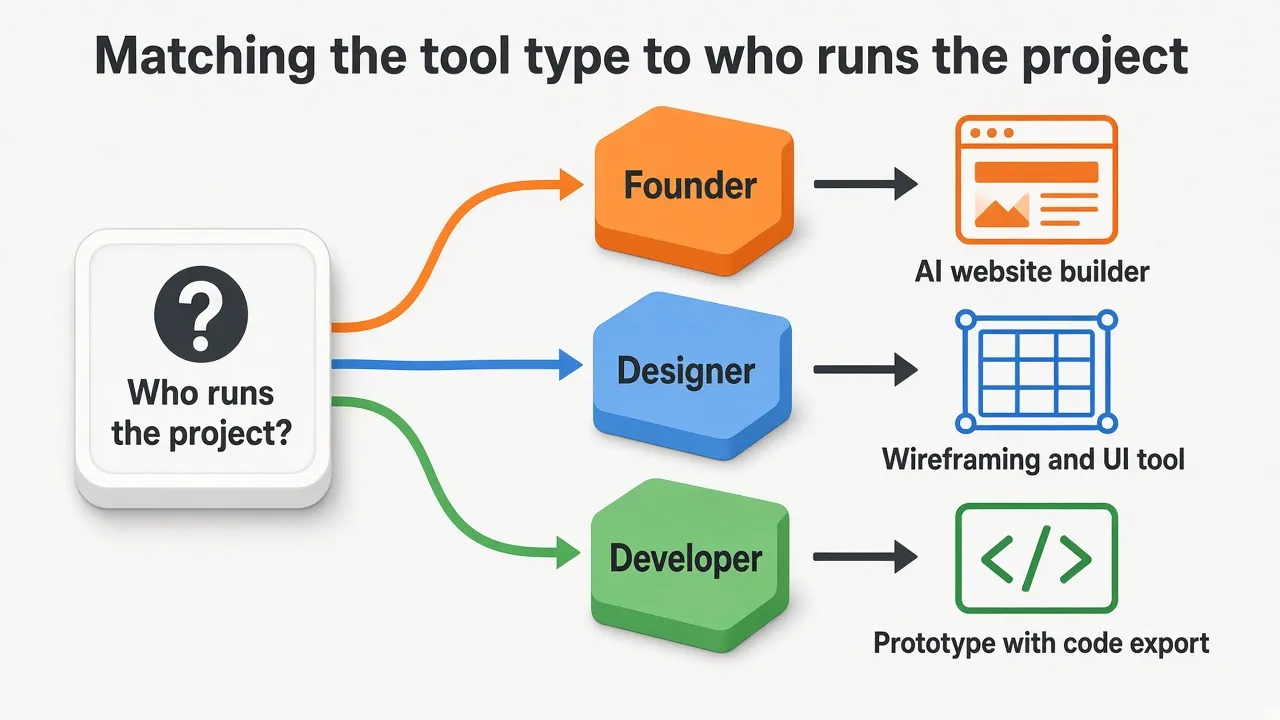
Many website projects combine one tool from each group rather than relying on a single platform. A wireframing tool settles structure, a builder handles the build, and an asset generator fills visual gaps. Matching that stack to the team’s skills keeps costs in line with real use.
Best Practices for Using AI Tools for Web Design
AI tools for web design perform best when every output is treated as a draft. The prompt sets the starting quality, and manual review catches what the model misses. Generative AI for web design also rewards teams that define the page goal before they open any tool.
Specific prompts are the first safeguard against generic layouts, which appear whenever the model fills a vague request with the most common pattern. A useful prompt names the audience, the page goal, and the sections in order, while brand constraints, tone, and elements to avoid narrow it further. In effect, the prompt is the project brief, so research findings belong in it.
Generated layouts need refining, since they often look finished while hiding a weak hierarchy or crowded sections. Checking each draft against core web design principles exposes these issues before they reach users. Regenerating one section usually beats rewriting the whole prompt. The first editing pass should cover these points:
- Hierarchy: One dominant headline and a clear reading path.
- Spacing: Consistent gaps between sections and elements.
- Call to action: A single primary action per section.
- Content fit: Real copy and images in place of placeholders.
Left unchecked, AI automation in web design drifts from the style guide, most visibly in color and type. A brand kit or design system loaded into the tool stops much of that drift, and saved style prompts keep later pages in step with the first.
Generated breakpoints often mangle long headings and tables, so responsive designs need testing on real devices. Checking menus, forms, and images at that width catches most failures early.
Every AI-generated page needs a final manual review before publication. Generated copy and assets can contain problems that visual inspection misses. A short final pass should confirm these points:
- Copy accuracy: Generated text can invent facts, features, or prices.
- Links and forms: Every path works on desktop and mobile.
- Image rights: Each asset has a clear commercial license.
- Loading speed: Main content passes Google’s Core Web Vitals check on mobile networks.
Conclusion
AI-driven web design accelerates the transition from idea to draft. Quality still depends on clear goals and careful review. Choosing tools by the job they do, from wireframing to building and asset creation, keeps the stack lean. Websites perform best when AI handles the volume and people make the decisions that shape conversion.