
Key Findings
- SaaS onboarding should prioritize completing core workflows over introducing every available feature.
- Role-based SaaS dashboards should separate daily tasks from administrative controls and permissions.
- SaaS navigation must accommodate expanding datasets, integrations, and features without structural redesigns.
- Reusable UI components help SaaS teams maintain consistency across frequent product releases.
- AI-powered SaaS interfaces should preserve user control over automated actions and generated outputs.
SaaS product design is the practice of shaping subscription software around the tasks, roles, and goals of its users. It covers research, interface structure, and the visual system that ties every screen together. Done well, it helps customers reach value quickly and keeps them working in the product after each release.
Subscription software faces a harder test than most digital products. Customers can leave at any renewal, so friction in daily work eventually shows up in churn and expansion revenue. Interfaces change with every release, which makes consistency and scalability as important as first impressions.
What Is SaaS Product Design?
SaaS product design is the process of planning how cloud software looks, behaves, and evolves for its subscribers. It combines user research, information architecture, and interface design with continuous measurement after launch. The goal is software that handles recurring business tasks efficiently and stays usable as accounts grow.
Cloud delivery changes the role of design in software development. SaaS updates can reach large user groups quickly, making confusing changes especially disruptive. Designers work in short cycles inside a shared product design and development workflow with engineers.
Several core principles shape SaaS usability and long-term growth. Each principle should guide concrete interface decisions. Together they give designers and engineers a shared review language.
- Task focus: every screen supports a specific job the user came to complete.
- Clarity: labels, states, and feedback tell users what happened and what comes next.
- Scalability: layouts and navigation absorb new features without a full redesign.
- Consistency: shared components make each module feel like part of one product.
- Accessibility: interfaces remain usable for people with different abilities and devices.
These SaaS interface design principles guide trade-offs when stakeholders request competing features. A user-centered SaaS design approach ranks requests by their effect on core workflows. Visual polish then supports comprehension of the most important actions.
How Does SaaS Product Design Differ From Traditional Product Design?
SaaS product design emphasizes continuous improvement because subscription products evolve throughout the customer relationship. Traditional products follow fixed release cycles, while SaaS platforms ship frequent updates. Revenue depends on renewals, so designers focus on long-term engagement as much as first purchase.
| Factor | Traditional Product Design | SaaS Product Design |
| Business model | One-time purchase or license | Recurring subscription with renewal risk |
| Release cycle | Fixed launches with long gaps | Continuous updates shipped to all users |
| User expectations | Learn features around major releases | Adapt to frequent changes with minimal disruption |
| Onboarding | Manuals or in-person setup | Guided in-product setup and self-service help |
| Success measure | Units sold and launch reviews | Activation, retention, and expansion revenue |
Expectations differ between buyers and daily users as well. Research each role separately, since goals and tolerance for complexity rarely match. Design must then serve both groups equally.
Essential Stages in Product Design for SaaS
Product design for SaaS moves from understanding the problem to shipping and refining a solution. Each stage reduces a specific risk, from building the wrong feature to releasing an unusable interface. Teams that follow a structured product design process catch weak concepts before engineering budgets are committed.
| Stage | Purpose | Key Activities | Expected Deliverables |
| Product discovery | Confirm the problem is worth solving | Stakeholder interviews and competitor review | Problem statement and opportunity map |
| User research | Understand users, roles, and workflows | Interviews, surveys, analytics review | Personas, journey maps, and job stories |
| Information architecture | Organize content and features logically | Card sorting, sitemap creation, navigation planning | Sitemap and navigation model |
| Wireframing | Define layout and screen priorities | Low-fidelity sketches and flow mapping | Wireframes and user flows |
| Prototyping | Simulate real interactions before coding | Clickable prototypes in Figma or similar tools | Interactive prototype |
| Usability testing | Validate that users can complete tasks | Moderated sessions and task tracking | Findings report and prioritized fixes |
| Developer handoff | Translate designs into buildable specs | Annotations and component documentation | Specs, assets, and component library |
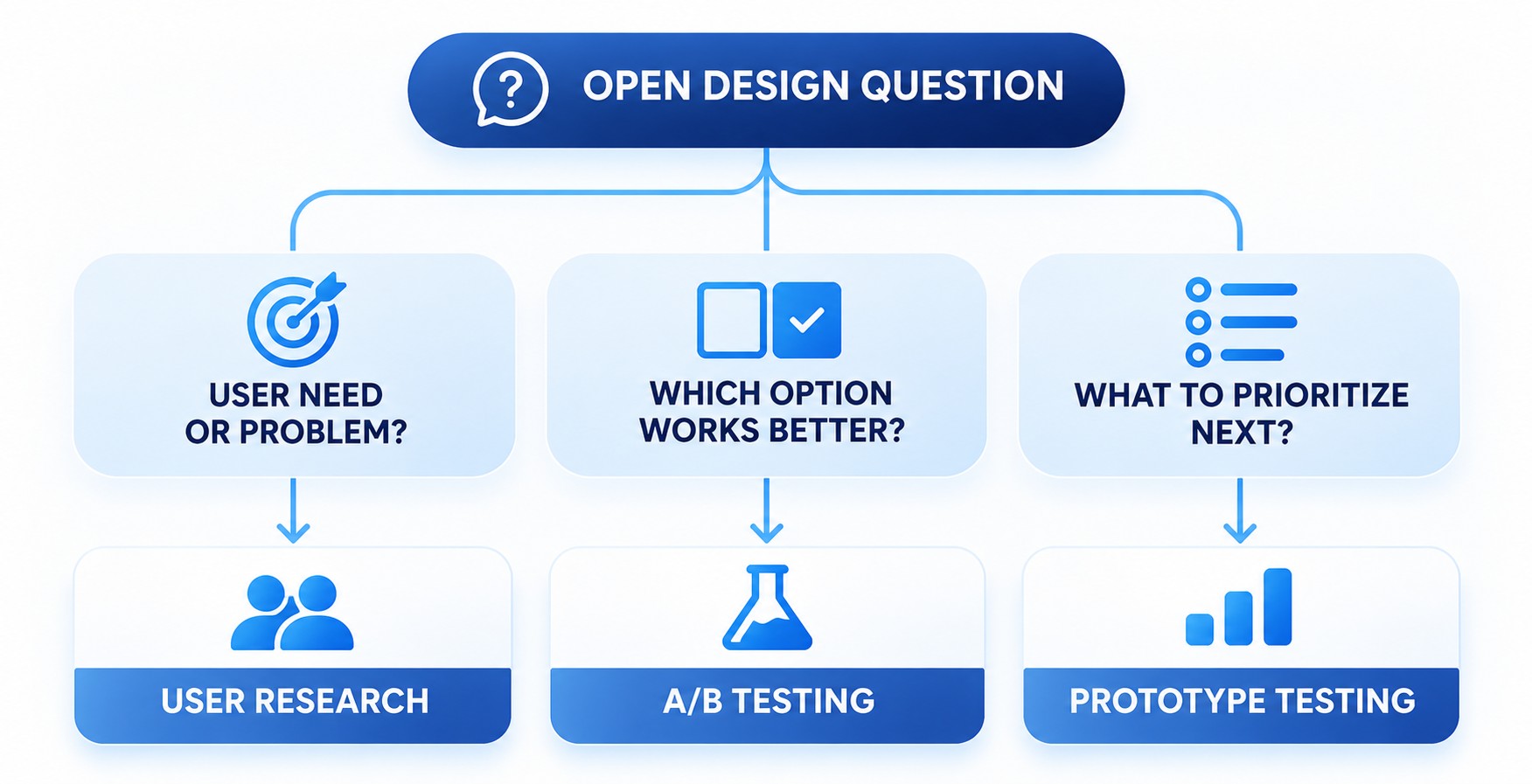
Concept validation happens throughout this sequence. Discovery interviews test whether the problem exists, while early prototypes test the proposed solution. SaaS prototyping and usability testing then confirm that real users can finish key tasks without assistance.
Feature prioritization depends on evidence gathered at each step. Many teams score candidate features by user impact, business value, and implementation effort. After launch, analytics and session recordings reveal where the shipped interface still causes friction.
Explore Our Design Services
Proven Practices for Building User-Friendly SaaS Products
Usability in subscription software comes from many small decisions applied consistently across the platform. Good product design for SaaS treats each decision as part of one connected experience. This coherence helps users move between product modules without relearning familiar interactions.
Design the Product Around Core User Workflows
Core workflows are the task sequences users repeat most, such as creating an invoice or approving a request. Identify them through product analytics, support tickets, and interviews with active accounts. A step-by-step map of each workflow shows where users wait, repeat input, or leave the product.
Simplify repeated workflows before adding new capabilities. Remove redundant confirmation screens, prefill known data, and let users act on items directly from lists. Keyboard shortcuts, bulk edits, and undo options let frequent users work quickly without risky confirmations.
Designing intuitive software experiences means accepting that not every feature deserves equal visibility. Inline validation flags form errors while users type, so they can fix mistakes before submitting. Review workflow maps after major releases, since new features can add steps to journeys that once felt simple.
Navigation in complex platforms works when users can predict where each function lives. Group dashboards, settings, and advanced tools into sections that mirror how customers think about their work. Labels should use customer vocabulary, since internal product names often confuse new users. Tree testing before visual design exposes labeling problems early and cheaply.
Visual hierarchy helps users scan dense screens quickly. Use size, weight, and spacing to separate primary actions from secondary options. Several techniques then keep advanced functionality accessible without overwhelming newcomers.
- Contextual controls: show editing options only when users select an item.
- Progressive disclosure: reveal advanced settings after users open an expanded panel.
- Persistent search: let users jump to any feature or record by name.
- Breadcrumbs: show location inside deep hierarchies and allow quick backtracking.
Design an Onboarding Experience That Demonstrates Product Value
Onboarding should lead each new account to its first meaningful result as fast as possible. Time to first value measures how long that takes, and shorter paths usually support stronger activation. SaaS onboarding experience design therefore starts by defining which action proves the product works for this customer.
Guided setup collects only the information needed to reach that first result. Interactive walkthroughs let users perform real actions, while contextual tooltips explain unfamiliar controls when needed. Sample projects fill empty workspaces with realistic data, so the dashboard shows its purpose immediately.
Empty states deserve the same attention as populated screens. Consistent SaaS graphic design makes empty states clearer through purposeful illustrations, recognizable icons, and concise instructions. A setup checklist with a progress bar shows remaining steps and where users stall.
Account for Different User Roles and Permission Levels
Most business platforms serve administrators, managers, and team members with different needs. Administrators configure billing, integrations, and access rules. Managers monitor progress and approve work, while team members focus on daily execution. One interface for everyone either overwhelms contributors or hides controls that administrators need.
Role-based dashboards solve this by showing each group its most relevant data and actions first. Access controls should be visible in the interface, so users understand why an option is unavailable. Disabled controls can show a tooltip naming the role or admin who can grant access.
Customizable workspaces add flexibility without multiplying separate designs. Users can pin reports or save filtered views. A shared layout system keeps these options bounded, so support teams can still guide any user.
Make Security Measures Clear Without Disrupting User Flows
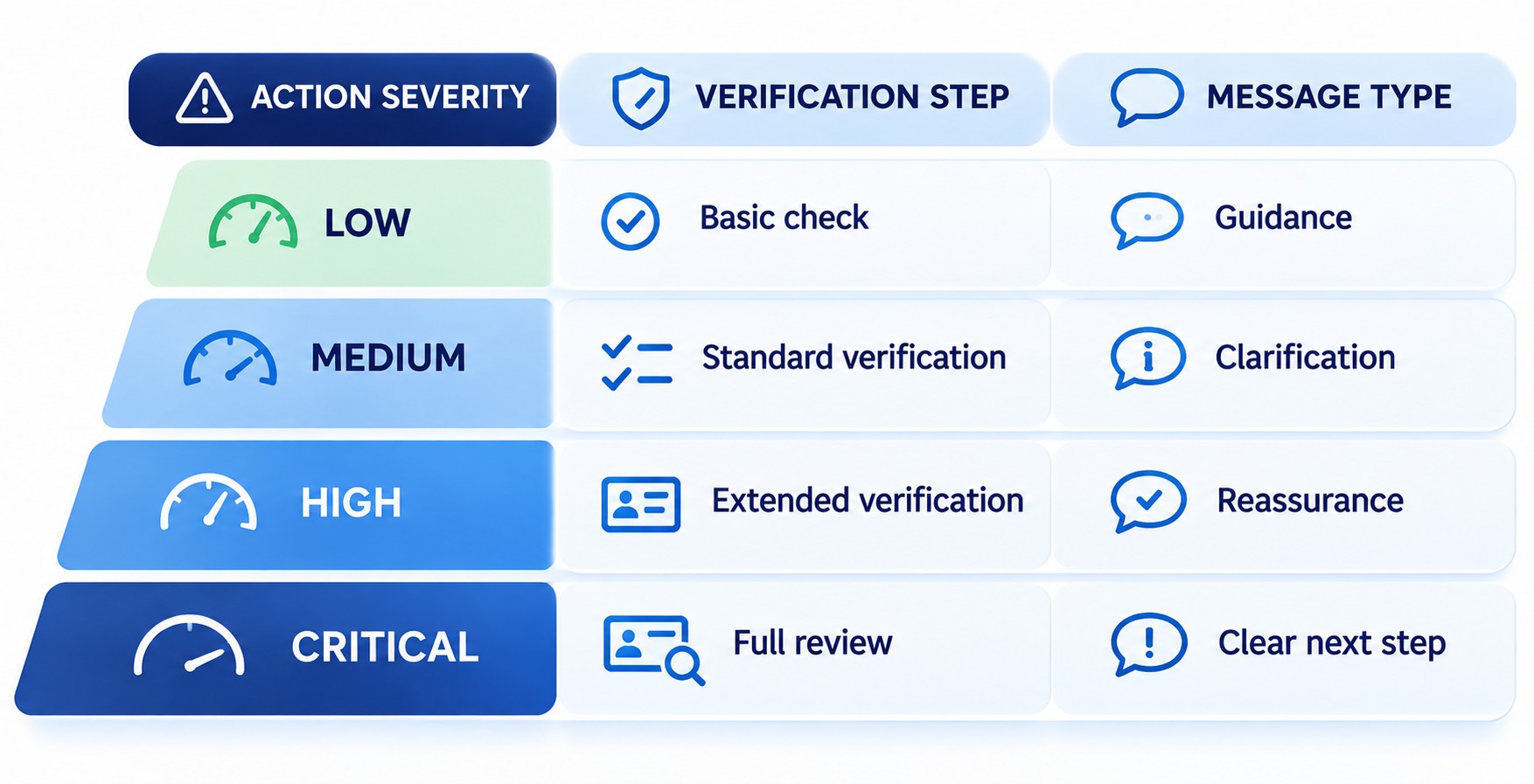
Security in SaaS products works best when users understand each prompt and why it appears. Authentication, identity verification, and session management should follow the same visual language as the rest of the interface. Unfamiliar or inconsistent security screens can look like phishing attempts and erode trust.
NIST SP 800-63B-4 sets authentication requirements for three assurance levels, including reauthentication timeouts. The guideline permits services to alert users before a session expires and offer reauthentication. SaaS teams should match those controls to system risks and compliance obligations.
Transaction confirmation needs similar care. High-risk actions such as deleting a workspace can require typing its name to confirm. The prompt should name the action, its consequences, and the reason extra verification is required.
Maintain UI Consistency Across the SaaS Platform
Consistency lets users transfer what they learn in one module to every other module. A shared design system defines reusable buttons, form fields, modals, and notifications. Engineers assemble new screens from these tested parts, which makes future feature development faster.
Consistent SaaS UI/UX design requires documented interaction rules that apply across product screens and support materials. Document component states, error messages, and accessibility behavior so teams implement patterns consistently. Regular audits of the component library remove duplicates that creep in as teams grow.
Design Interfaces That Scale With Product Complexity
Scalable interfaces accommodate new features, larger datasets, and bigger teams without structural redesigns. Plan navigation with room for additional sections, such as collapsible sidebars that support nested groups. As teams expand, dashboards should support shared views, ownership filters, and role-specific access without duplicating entire interfaces.
Data organization matters as accounts accumulate large volumes of records. Tables need filtering, bulk actions, and saved views from the start. Each connected integration adds settings and sync statuses that need clear display. A dedicated integrations hub with status badges and last-sync times keeps these details in one place.
Integrate AI to Create More Adaptive SaaS Experiences
AI can make SaaS products more adaptive by responding to how each user works. Usage patterns can reveal frequently accessed reports and recurring tasks that may benefit from personalization. AI-driven SaaS product experiences turn those signals into several practical patterns.
- Personalized dashboards: surface the reports and records each user opens most often.
- Task automation: fill repetitive fields or categorize incoming items, with undo.
- Feature recommendations: suggest relevant tools based on recent activity.
- Contextual assistance: answer questions about the current screen in plain language.
Placement determines whether these features help or distract. Put AI suggestions inside existing workflows, where users already make related decisions. Label generated content clearly and let users accept, edit, or dismiss it with one action. Core interactions should still work predictably for people who ignore AI.
Applying AI for product design can speed up research synthesis and early concept variations. Every generated option needs validation with real users afterward. Designers should treat AI output as a starting point, not a finished design decision.
How to Develop a SaaS Product Design Strategy
A SaaS product design strategy connects user expectations, business goals, and technical constraints in one shared plan. It tells teams which problems to solve first and which principles guide interface decisions. Without it, design work tends to follow the loudest feature request.
Start with business objectives, such as reducing churn or increasing expansion revenue. Translate each objective into user outcomes, then into measurable design priorities. Engineering capacity, system architecture, and integration dependencies determine which design priorities can realistically ship.
Align features with customer needs through regular research and usage reviews. Product, design, and engineering leads should review the roadmap together quarterly. SaaS user journey optimization becomes easier when everyone sees the same friction points.
- Define objectives: connect each design initiative to a measurable business outcome.
- Set principles: document accessibility commitments, interaction rules, and product voice.
- Choose metrics: assign one behavioral measure to each priority before implementation.
Strategy also covers how the product communicates its identity. Consistent branding for SaaS connects interface typography, colors, and messaging. These shared rules help users recognize the product across modules and customer touchpoints.
What Defines Successful SaaS Product Design?
Successful SaaS product design lets users complete important tasks quickly, confidently, and without outside help. It shows up in product adoption, user satisfaction, and long-term retention. Strong design combines intuitive navigation, efficient workflows, and scalable patterns.
| Quality | What It Looks Like | How It Supports Business Results |
| Intuitive navigation | Users find features without searching help docs | Fewer support tickets and faster adoption |
| Efficient workflows | Frequent tasks need minimal steps | Faster task completion and fewer errors |
| Scalable interfaces | New features fit existing structure | Lower redesign costs as the product grows |
| Consistent UI patterns | Components behave identically everywhere | Faster learning across modules |
| Accessibility | Interfaces work with assistive technologies | Broader market reach and procurement readiness |
| Seamless onboarding | New users reach first value quickly | Stronger activation and trial conversion |
Accessibility deserves specific attention in enterprise sales. At Level AA, WCAG 2.2 requires pointer targets of at least 24 by 24 CSS pixels, with exceptions. Its Accessible Authentication (Minimum) criterion bars cognitive function tests in login steps without a listed exception. Meeting SaaS usability and accessibility standards early can prevent costly retrofits later.
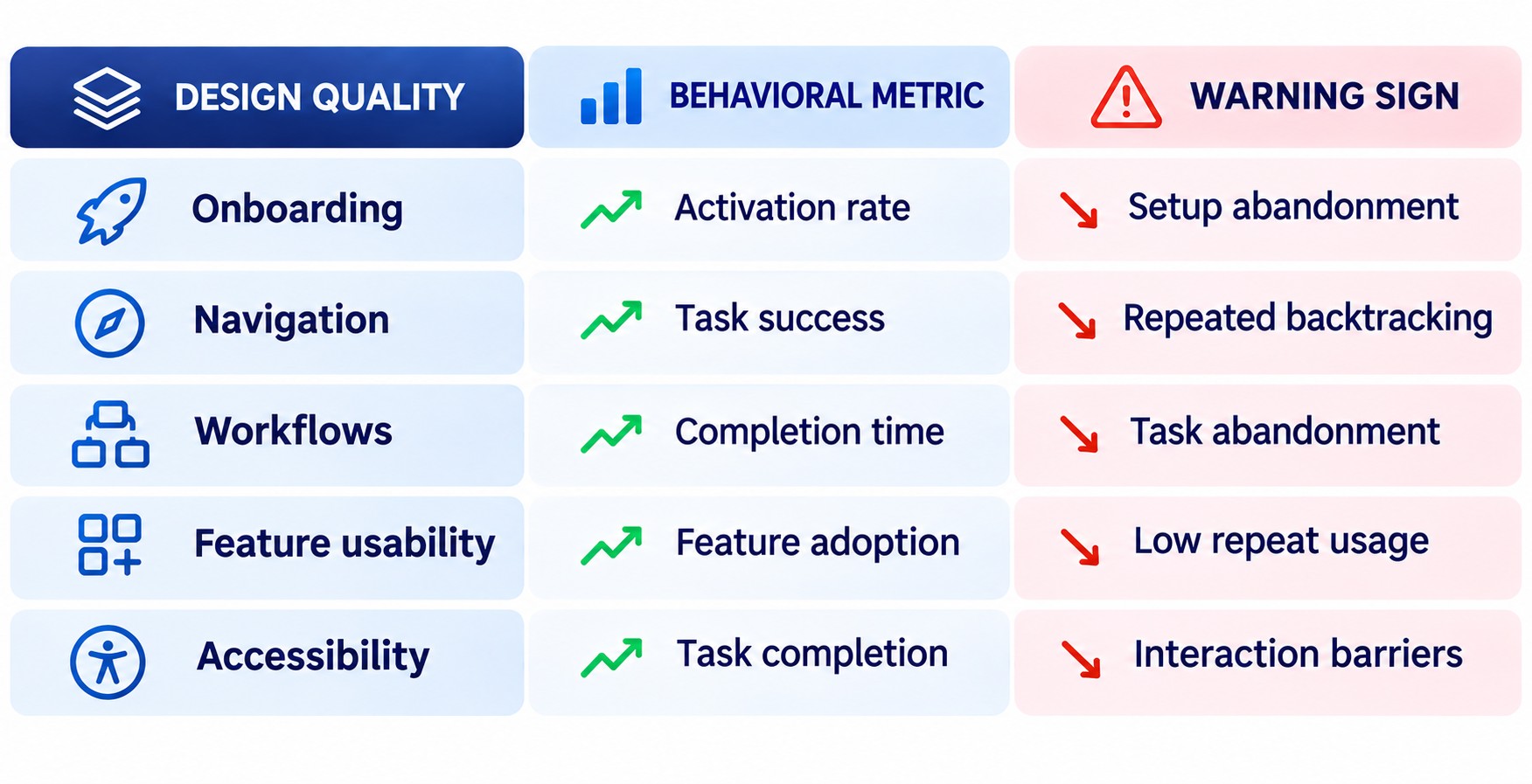
User experience design for SaaS platforms proves its value through behavior data. Track activation, feature adoption, and retention cohorts after each release. Qualitative feedback then explains why those numbers change.
Conclusion
Usability helps subscription products retain customers by making recurring tasks easier and more predictable. Strong design starts with real workflows and builds onboarding and role-specific views around them. Security, consistency, and scalability determine whether that experience survives continuous releases.
Treat design as an ongoing system that combines strategy, research, and measurement. Teams that validate decisions and track behavior after launch can improve the product with every update. The most durable interfaces grow in capability without growing in complexity.