


Ecommerce UX design is the process of optimizing an online shopping platform to make the customer experience enjoyable and hassle-free. It’s not about how the online store looks, but how it works and how users feel when navigating the site.
UX matters in Ecommerce because it builds trust, removes friction, and makes the shopping experience easier to complete. If your platform’s UX is bad, users may feel discouraged from shopping from your brand and abandon their online purchases.
Poor mobile optimization, for example, is a common pitfall in UX design. Many users visit online stores on mobile, but mobile checkout abandonment rate is at 85%. And it’s often because of non-intuitive mobile UX design.
Ecommerce brands can avoid the common UX pitfalls through user-centered design that enhances user experience. This article discusses practices that designers use to build intuitive Ecommerce UX design that improve user experience and increase conversions.
Why Better Ecommerce UX Leads to More Purchases
Better Ecommerce UX leads to more purchases because it removes user friction, builds trust with customers, and enhances every customer interaction with an online store.
The difference between UX vs UI is that UX focuses on how intuitive your site is, while UI focuses on how the site looks. Your website’s aesthetics do matter, but UX design for online stores focuses on delivering a smooth, intuitive shopping experience that has a stronger impact on conversions and customer retention. When the buying process is effortless and predictable for users, they’re far more likely to complete a purchase.
Bad UX can make users doubt the platform, which can lead to them abandoning their purchase. According to PricewaterhouseCoopers (PWC), 32% of customers would leave a brand after a single bad experience.
These bad experiences usually come from specific gaps in the Ecommerce user experience. Each gap becomes a point of friction that disrupts the customer journey and impacts conversion rates.
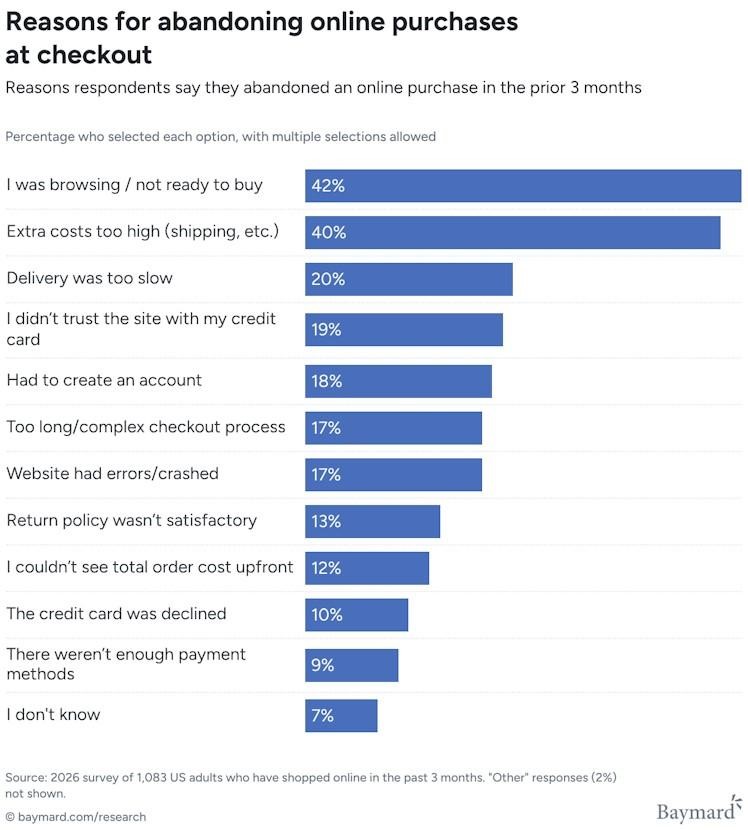
Baymard Institute’s study shows that most users abandon online purchases at checkout because of high extra costs or that they weren’t ready to buy. However, users also cite reasons that can be addressed with better UX design, including complex checkout processes and concerns about data security.
These reasons show how friction and uncertainty affect trust at critical decision points in the customer journey.
UX is important in Ecommerce because the online store is often the main touchpoint between brands and customers. Poorly designed UX can turn users away from your site, which can impact sales and conversions.
To understand how Ecommerce user experience directly influences purchases, it’s useful to break it down into four key drivers:
- Reduced friction
- Trust building
- Simplified decision-making
- Buyer confidence
Firstly, reducing friction is about ensuring that users are kept engaged throughout the buying process. Examples of friction include having users go through longer wait times and additional steps when navigating a site. When your site’s navigation is intuitive, pages load quickly and checkout steps are simple. Users can easily move from product discovery to purchase without unnecessary interruptions.
Building trust is also critical in driving conversions. Being transparent about pricing, return policies, and authentic customer reviews can help reduce customer uncertainty. When users feel confident that there are no hidden costs, they’re more likely to complete the purchase and return later.
UX also improves conversions by simplifying customers’ decision-making process. Users prefer intuitive shopping environments where information is easy to process and purchase decisions feel straightforward. Simplified layouts, clear product categorization, and predictable interactions lower decision fatigue and keep users focused on completing their purchase.
Finally, effective UX design builds buyer confidence throughout the customer journey. When users feel certain about their choices thanks to UX features like clear product information, smooth navigation, and a reliable checkout process, they’re less likely to hesitate on a purchase. This sense of confidence is often the final factor that turns customer intent into a complete purchase.
Together, these drivers show how UX design for Ecommerce shapes both usability and purchase intent.
Essential Ecommerce UX Features Every Online Store Needs
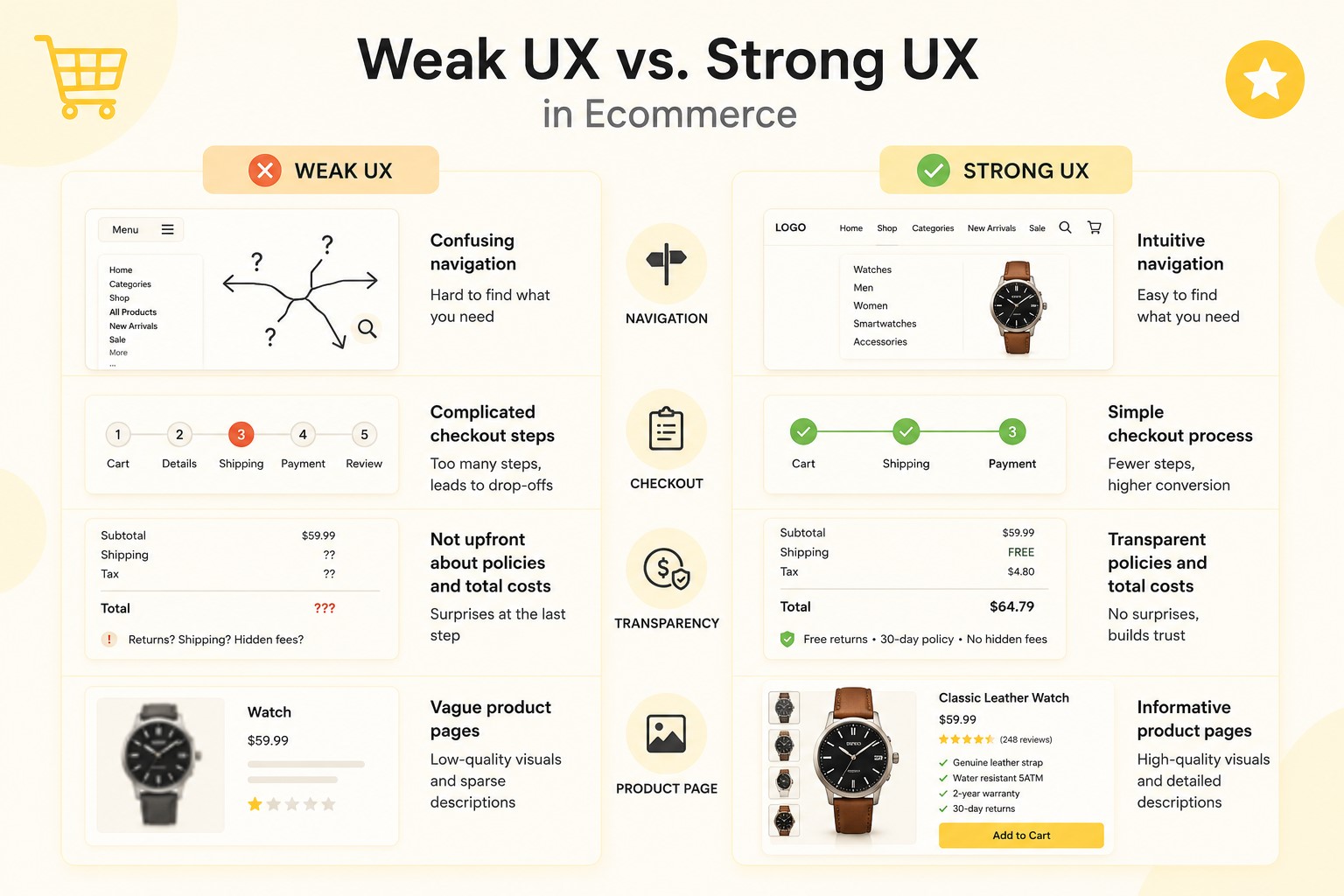
A strong Ecommerce user experience is not built on visually appealing design alone. It also relies on essential features that influence how users interact with an online store. From site navigation and product search to checkout processes and trust signals, each element plays a role in guiding users through the buying process.
When these features work together seamlessly, they improve site usability, reduce friction, and encourage users towards a more efficient path to completing a purchase.
| UX Feature | Purpose | Why It Matters | How It Impacts Conversions |
| Intuitive Navigation | Organizes site content into clear categories and paths | Helps users find products and navigate parts of the site without confusion or backtracking | Reduces chances of users leaving the site when browsing and improves product discovery |
| Smart Search | Enables users to find products using keywords and suggestions | Supports high-intent users who prefer direct product access | Increases the likelihood that users will complete an online purchase |
| Product Filtering | Makes it easier for users to refine product search results | Prevents overwhelming users when browsing large product catalogs | Improves engagement and increases the chance of finding a product |
| Mobile Optimization | Allows users to easily navigate online stores even on mobile phones | Ensures that user experience is smooth and convenient for mobile shoppers | Boosts conversions from mobile traffic and reduces bounce rates |
| Fast Page Load Speed | Reduces loading times when users navigate pages on the store website | Keeps users engaged and prevents frustration or abandonment | Lowers bounce rates and improves completion rates across the customer journey |
| User-Generated Reviews | Displays feedback and ratings from previous customers | Builds credibility and lowers uncertainty in customer decision-making | Builds trust and improves conversion rates on product pages |
| Transparent Policies and Pricing | Communicates return policies, shipping costs, and payment options upfront | Removes surprises that can cause hesitation or distrust | Lowers cart abandonment and increases checkout completion |
| Secure Payment Options | Offers users various safe and trusted payment methods | Reassures users that their financial data is protected | Increases customer confidence at checkout and reduces payment-stage drop-offs |
| Quick and Reliable Checkout | Simplifies checkout processes for users purchasing from the platform | Prevents user fatigue and reduces complexity during checkout process | Improves checkout completion rates and reduces cart abandonment |
| Frequently Asked Questions | Provides answers to commonly asked questions, including customer concerns, product-related queries, and returns policies and procedures | Establishes credibility and builds trust and confidence with the buyer | Keeps users on-site and supports faster purchase decisions |
These essential features can improve your brand’s digital storefront optimization. Missing even just one can impact Ecommerce website usability, which can affect customers’ shopping experience.
Read Also: Top Ecommerce Landing Page Examples + Useful Design Tips
Proven Ecommerce UX Practices That Increase Conversions
Improving Ecommerce UX design is not just about understanding user behavior. It also requires applying specific, data-driven practices that work together to create an intuitive shopping experience. The most effective online stores don’t rely on guesswork. They make use of deliberate UX decisions guided by user journey mapping to reduce friction, improve usability, and create a smoother customer journey from product discovery to checkout. These practices optimize each stage of the buying process, from product discovery to checkout.
Below are key UX strategies designed to improve Ecommerce conversion rates when implemented properly.
If potential buyers can’t easily find what they need on your site, they’ll just leave and might even visit your competitors’ stores instead. Intuitive website navigation is about making it easier for users to interact with your online store so they can find what they need without too much effort. In practice, that means simplifying or streamlining menus so users can make fewer clicks when browsing your product catalog and exploring other pages on your website. Users should be able to access the navigation menu from any page on your site. Simplifying the shopping process was the first objective when we designed the online jewelry store Lush Stonez.
Improve Site Search With Predictive and Smart Results
Site search is a handy feature for users, especially if they already have an idea of what product they’re looking for. It allows them to find a product by entering a corresponding request or keyword in the search field instead of manually clicking through various pages and categories.
Here are a few tips you can implement to improve your Ecommerce website’s search functionality:
- Place the search bar somewhere easy to find and make it accessible from any page on your site.
- Include an intuitive autocomplete function that can generate search suggestions based on what users type in the field.
- Make the search function typo-proof so it will still show results even if users misspell terms.
- Add personalization so the search function can offer results tailored to each user based on previously searched terms.
A smart search function makes it easier for customers to find what they need in just a few clicks even if they’re navigating a large product catalog.
Enhance Product Pages With Clear Visuals and Information
Clear images, videos, and descriptions are especially important for Ecommerce. Unlike in retail, where customers can browse products in person at a physical store, online shoppers typically have to rely on browsing an online product catalog. That means online stores need to have clear information and visuals of their products to give users as much information as possible so they can decide if they want to make a purchase.
Product pages with high-quality visuals and information can also help entice potential buyers. According to research from Nautilus Marketing, 62% of shoppers become more interested in a product if they see photos or videos of it first.
Pottery Barn does this really well. Their homepage draws site visitors’ attention with high-quality images of their products while making it easier for users to view different product categories.
Build Trust With Transparent Pricing and Policies
Visible shipping costs, return policies, and secure payment indicators reduce hesitation because it reassures customers that they won’t be surprised by any hidden costs. Openly disclosing these details builds a sense of trust between the customer and the brand, which is crucial for converting first-time visitors into paying customers.
Book a Call
Optimize Mobile UX for On-the-Go Shopping
Mobile-first shopping experience, fast load times, and touch-friendly interfaces improve the shopping experience for mobile users. This is because mobile-friendly UX and UI allow them to browse product catalogs even on smaller screens, which can encourage them to shop even when they’re on the go.
Mobile optimization for brands has become essential because of the rise of mobile commerce. According to Tenet, 73% of users leave websites that aren’t mobile-friendly. But on the flip side, mobile-friendly websites can potentially increase conversions by 30%.
Ensuring a smooth experience even for mobile users can increase customer retention. It can also improve SEO for your website because search engines prioritize mobile-friendly sites, per Tenet.
Etsy is an online marketplace that has a well-optimized mobile site. Their mobile site homepage is designed for smooth browsing, with trending products and popular categories featured on the homepage, along with a visible search bar for quick product searching.
Use Personalization to Improve Relevance and Engagement
Product recommendations, dynamic content, and behavior-based suggestions enhance user experience because they create a unique shopping experience tailored to each potential buyer based on their personal interests. According to Twilio, 71% of customers walk away from purchases if the experience feels irrelevant, but 88% are more likely to make a purchase when brands personalize engagement in real time.
Personalization can increase engagement and average order value because it can increase the likelihood of visitors staying on the site. If they’re offered product recommendations tailored to their interests and behavior, there’s a chance that they’ll find products they like and even make repeat purchases.
Make Product Filtering More Granular and Useful
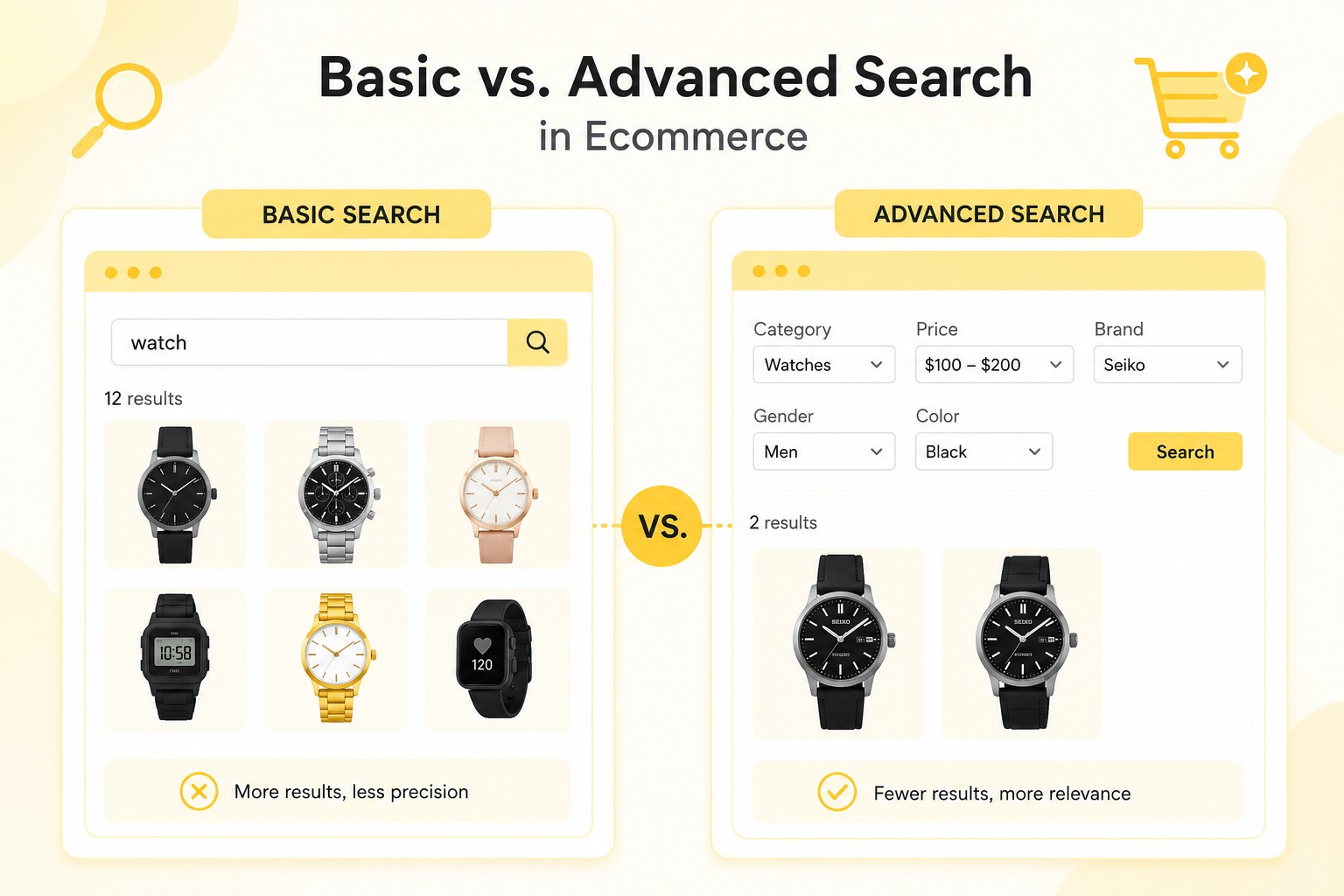
Navigating large catalogs can overwhelm users, which may cause frustration and site abandonment. Advanced filtering options can help users quickly narrow down their search, so they can find what they’re looking for much faster than scrolling through entire catalogs.
Advanced filtering options can sort products by various categories, including:
- Size
- Color
- Price
- Brand
- Attributes
Better filtering improves product discoverability, reduces friction, and increases the likelihood of users completing purchases.
Speed Up Page Load Times Across Key Templates
Consumers don’t like to be kept waiting. Most of the customers admit they feel most valued by companies when they respect their time and don’t make them wait. Your website should have fast load times across key templates that play a role in the shopping experience, like the homepage, categories, product pages, and the checkout page.
If your website pages take too long to load, site visitors could become frustrated and leave. Per Tenet, 88% of users are likely to leave a site if it loads too slowly, and even a 1-second delay in load time can lead to a 7% decrease in conversions.
Performance optimization reduces bounce rates, improves trust, and supports conversion-focused design by keeping users engaged throughout the customer journey.
Understanding what your customers need to have a smooth shopping experience and how you can optimize your website to meet those needs is the core of the UI/UX design process.
| Practice | Why It Matters for Increasing Conversions |
| Optimize product discovery through intuitive navigation |
|
| Improve site search with predictive and smart results |
|
| Enhance product pages with clear visuals and information |
|
| Build trust with transparent pricing and policies |
|
| Optimize mobile UX | Improves website usability on smaller screens |
| Use personalization |
|
| Make product filtering more granular and useful |
|
| Speed up page load times |
|
Conclusion
The goal of design for Ecommerce is to optimize online store platforms to enhance the shopping experience. UX design directly impacts conversion rates and purchases because users are sensitive to friction and uncertainty, and may abandon purchases due to poor user experience. However, when executed well, UX can also become a strong conversion driver that reduces friction, encourages customer loyalty, and repeat purchases. User expectations and needs often shift over time, and strong UX design constantly tests usability and optimizes features and practices to keep up with these shifts.