



Key Findings
- Framer shortens iteration when designers control both layout and publishing.
- Webflow becomes more efficient as CMS relationships and editorial roles expand.
- Motion-heavy projects favor Framer, while structured content operations usually favor Webflow.
- Platform cost depends on maintenance workload, not only monthly plan prices.
- The right choice follows post-launch ownership and expected website growth.
Modern visual website builder platforms have changed how professional websites are designed and launched. Instead of relying entirely on traditional development, designers can now create responsive websites while reducing production time. Framer vs Webflow remains a common comparison among agencies, startups, and internal product teams.
Although both platforms belong to the no-code ecosystem, they solve different problems. Framer focuses on rapid interface design and interactive experiences inspired by modern product design workflows. Webflow emphasizes structured content management, scalable websites, and production-ready publishing.
This guide compares every important aspect of both platforms. You will learn where each platform performs best and which practical limitations matter.
Webflow vs Framer: Main Differences at a Glance
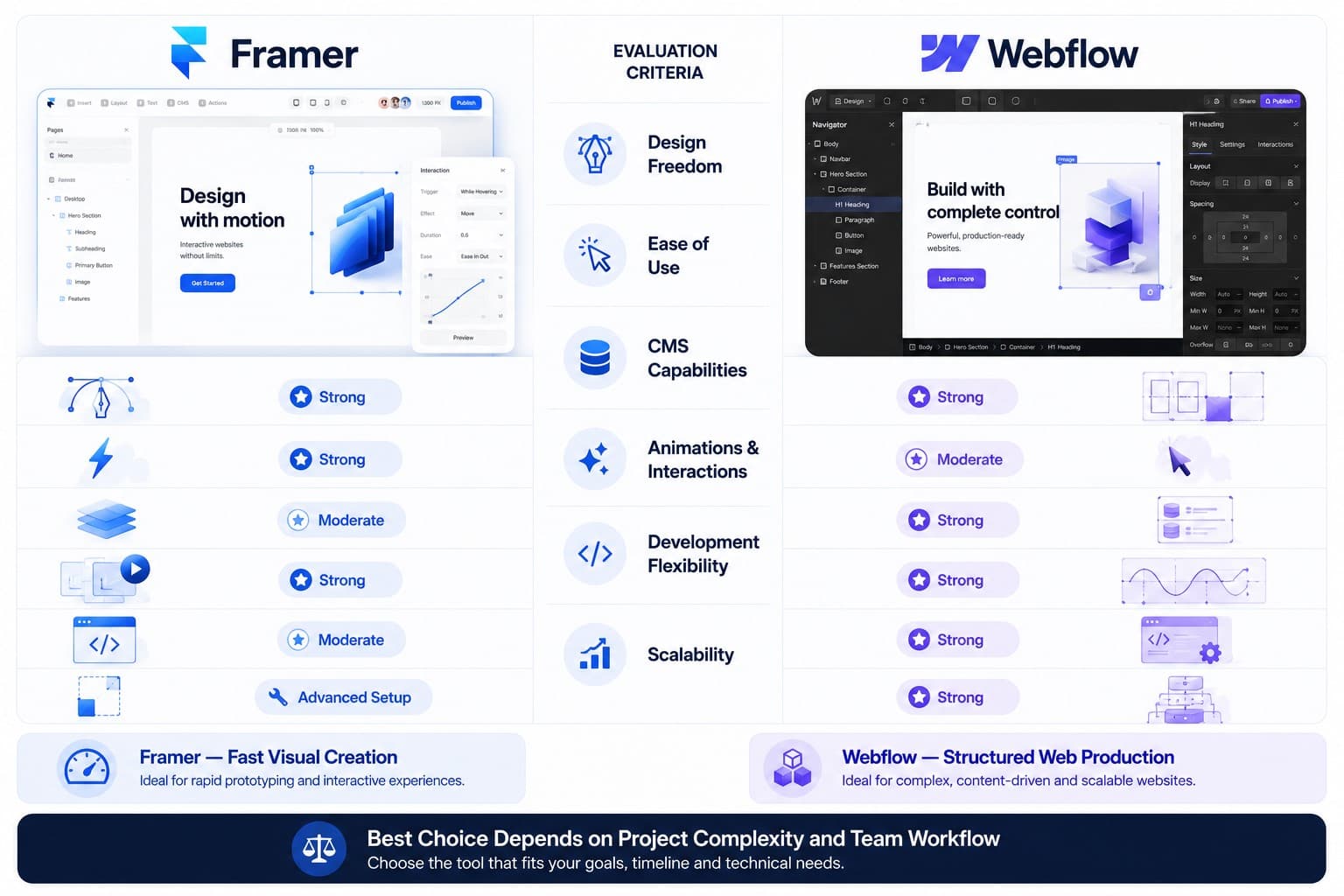
Webflow vs Framer can be summarized in one sentence. Framer prioritizes design speed and visual creativity, while Webflow prioritizes scalability, structured content, and long-term website management. The best platform depends on what happens after launch rather than how quickly the homepage is built.
Many comparison articles focus almost exclusively on visual editing. That approach overlooks how websites evolve after publication. Marketing teams eventually need to update content, expand landing pages, optimize SEO, and maintain consistent performance. Those everyday tasks often determine whether a platform remains efficient after the initial launch.
| Category | Framer | Webflow |
| Primary strength | Interactive design | Structured website development |
| Learning curve | Easier for designers | Broader feature set |
| CMS | Basic | Advanced |
| SEO controls | Strong for marketing sites | More comprehensive |
| Best project type | Landing pages and portfolios | Business websites and content hubs |
| Scalability | Moderate | High |
The comparison shows that neither platform is universally better. Framer and Webflow address different production needs despite sharing similar no-code foundations. Project requirements should guide the decision instead of feature counts.
Pros & Cons of Webflow and Framer
Both Framer and Webflow deliver professional websites without traditional front-end development. Each platform also introduces trade-offs that become more noticeable as projects grow. Understanding those compromises prevents expensive migrations later.
✅ Advantages
- Fast visual editing.
- Excellent animation and prototyping tools.
- Intuitive interface for designers.
- Efficient landing page builder.
- Rapid publishing workflow.
❌ Limitations
- Less powerful CMS.
- Limited scalability for content-heavy websites.
- Smaller ecosystem than Webflow.
- Fewer advanced content management workflows.
✅ Advantages
- Enterprise-grade CMS.
- Advanced responsive website development.
- Extensive SEO configuration.
- Flexible content architecture.
- Strong collaboration features.
❌ Limitations
- Steeper learning curve.
- More complex interface.
- Longer setup for simple projects.
- Advanced features require additional learning.
Choosing between Webflow and Framer becomes easier after identifying the project’s long-term priorities. Teams focused on rapid campaigns usually value design speed. Organizations managing hundreds of pages typically benefit from stronger content management capabilities.
A Detailed Comparison of Webflow and Framer
Quick comparisons rarely explain how each platform performs during real production work. Daily responsibilities include publishing content, maintaining SEO, supporting marketing campaigns, and introducing new features. Those activities reveal practical differences that simple feature lists often overlook.
The following sections compare both platforms using criteria that influence long-term website success.
🛠️ Development Complexity
Their low-code website creation workflows still allow advanced customization when projects require it. Framer emphasizes visual editing throughout the design process. Webflow provides a structured website development platform for organizing complex projects over time.
Designers familiar with interface tools usually become productive in Framer more quickly. Its editing experience feels similar to modern UI software, allowing rapid experimentation with layouts and animations. That familiarity reduces onboarding time for creative teams.
Webflow requires a deeper understanding of website structure. Webflow’s developer-friendly features provide greater control over classes and reusable components. The additional learning investment often pays off when projects become larger or require advanced integrations.
Development comparison
| Factor | Framer | Webflow |
| Initial learning | Faster | Moderate |
| Advanced customization | Moderate | Extensive |
| Component reuse | Strong | Strong |
| Content architecture | Basic | Advanced |
| Project scalability | Moderate | Excellent |
A practical rule helps simplify the decision:
- Choose Framer when visual experimentation drives the project.
- Choose Webflow for structured websites expected to grow.
- Evaluate future content requirements before selecting either platform.
- Consider maintenance responsibilities alongside initial development speed.
For teams evaluating other no-code website builders, the biggest distinction often lies in long-term scalability rather than visual editing alone.
🧑💻 User-Friendliness
Both platforms are accessible to non-developers, but they target different users. This makes Framer a designer-friendly website builder for visually led marketing teams. Webflow requires more technical understanding, yet it offers greater control over how websites are structured.
Framer offers a drag-and-drop website editor with controls familiar to interface designers. Creating layouts, editing typography, and adding interactions require fewer steps than in Webflow. Marketing teams can also publish updates without navigating extensive configuration panels.
Webflow introduces more concepts at the beginning. Users learn page structure, CSS classes, reusable components, and responsive behavior while building the website. Although onboarding takes longer, these concepts create more predictable workflows as projects expand.
The practical difference becomes clearer when responsibilities change over time.
| User Type | Framer | Webflow |
| UI designer | Excellent | Very good |
| Marketing manager | Very good | Good |
| Content editor | Good | Excellent |
| Front-end developer | Good | Excellent |
| Large marketing team | Moderate | Excellent |
Ease of use should never be evaluated only during the first week. Teams should also consider how efficiently new employees can manage the website six months after launch. A structured website design process should reflect internal workflows. The easiest interface does not always provide the best long-term results.
🎨 Design and Customization
Design flexibility often determines which platform suits a project better. Their design customization options differ most in animation control and structural flexibility. Understanding those differences prevents unnecessary compromises later.
Framer website design follows modern interface principles and supports rapid visual experimentation. The specialists recommend using animation only when it improves usability rather than distracting users. Its built-in animation and prototyping tools encourage rapid experimentation before publishing.
Webflow website design connects visual decisions with production structure and responsive behavior. This relationship gives designers more precise control over scalable interfaces while keeping layouts easier to maintain.
The difference becomes especially noticeable during larger redesign projects.
| Design Requirement | Framer | Webflow |
| Interactive website design | Excellent | Very good |
| Motion effects | Excellent | Very good |
| Responsive layouts | Very good | Excellent |
| Component systems | Strong | Excellent |
| Design system scalability | Moderate | Excellent |
A common misconception is that greater creative freedom always produces better websites. In practice, excessive customization often creates maintenance challenges. Sustainable website design flexibility depends on balancing creativity with consistency across the entire website.
Projects requiring highly tailored interfaces should also consider custom website design vs templates before selecting a production workflow.
📝 Content Management
Content management often determines whether a website remains efficient after launch. The platforms diverge most when publishing volume and editorial complexity increase. Small marketing websites may never reach those limits, but growing businesses usually do.
Framer offers lightweight CMS functionality suitable for landing pages, portfolios, and smaller collections. Editors can publish updates quickly without managing complex relationships between different content types. This simplicity benefits projects with limited publishing requirements.
Webflow provides a significantly more mature content management environment. Custom collections, reference fields, dynamic templates, and structured publishing workflows make large websites easier to organize. These capabilities reduce manual work as content libraries continue expanding.
| CMS Feature | Framer | Webflow |
| Basic collections | ✓ | ✓ |
| Reference fields | Limited | ✓ |
| Dynamic templates | Moderate | ✓ |
| Editorial workflows | Basic | Advanced |
| Large content libraries | Moderate | Excellent |
A strong CMS should support future growth instead of only current requirements. Teams expecting frequent publishing usually benefit from more structured content architecture.
When evaluating a CMS capabilities comparison, decision-makers should prioritize editorial workflows rather than simply counting available features.
Book a Call
🔍 SEO and Discoverability
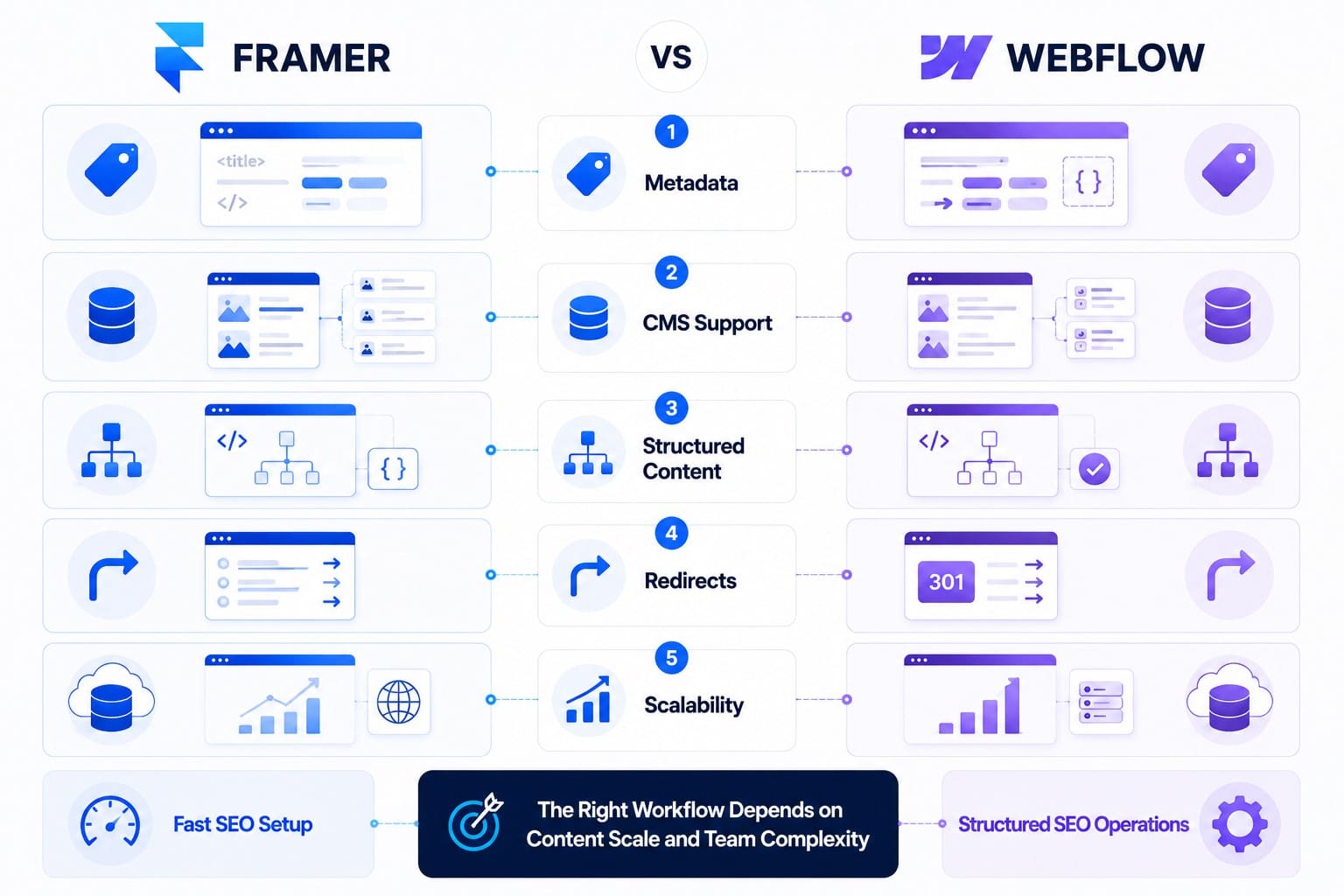
Both platforms provide the technical foundation needed for search visibility. The difference lies in how much control users have over optimization as websites become more sophisticated. A modern SEO-friendly website builder should support both technical implementation and ongoing content improvements.
Framer includes essential SEO settings such as custom metadata, canonical tags, redirects, XML sitemaps, and clean page structures. These capabilities satisfy the needs of many marketing websites and startup landing pages. Most optimization tasks remain straightforward for non-technical teams.
Webflow extends those capabilities with greater control over dynamic content, structured collections, and scalable metadata management. Large websites with hundreds of pages benefit from stronger automation and content organization. These advantages become increasingly valuable as organic visibility grows.
Google’s SEO starter guide explains that helpful content and accessible site architecture matter more than the technology stack. Technical controls matter because they help implement SEO best practices consistently rather than replacing high-quality content.
Several factors influence long-term discoverability regardless of platform:
- Logical website architecture.
- Clean metadata implementation.
- Fast page loading.
- Consistent internal linking.
- High-quality content.
Good SEO also depends on design decisions. Following established website design practices improves accessibility, usability, and search performance throughout the website lifecycle.
💸 Pricing
Pricing influences long-term costs as much as monthly subscriptions. A useful pricing comparison must include hosting, collaboration, and future scaling costs. Teams should estimate future requirements before choosing either platform.
Framer keeps pricing relatively straightforward. Most marketing websites and landing pages fit comfortably within its standard plans. Organizations launching campaigns quickly often appreciate the predictable pricing structure.
Webflow offers more flexibility across project sizes. Individual websites remain affordable, while larger organizations benefit from advanced CMS limits, team collaboration, and enterprise options. Those capabilities increase costs but also reduce operational constraints as websites grow.
| Pricing Factor | Framer | Webflow |
| Entry cost | Lower | Comparable |
| CMS scaling | Limited | Extensive |
| Team collaboration | Good | Excellent |
| Enterprise options | Limited | Extensive |
| Best value | Marketing sites | Growing businesses |
The cheapest platform is not always the most economical. A website requiring migration after one year usually costs more than selecting the appropriate platform from the beginning.
Read Also: Framer vs WordPress: Traditional CMS or Modern No-Code Builder?
⚙️ Performance and Maintenance
Website performance depends more on implementation than platform choice. Both Webflow and Framer generate optimized production code and global hosting infrastructure. Differences appear when websites become larger and content operations become more demanding.
Framer performs exceptionally well for lightweight marketing websites. Its publishing workflow minimizes unnecessary complexity, helping pages load quickly with limited maintenance. Teams also spend less time managing technical configurations.
Webflow provides stronger operational control for long-term maintenance. Structured CMS collections, reusable components, and scalable page architecture simplify updates across large websites. Marketing teams can publish new content without rebuilding existing layouts.
Performance should also include operational efficiency.A fast launch creates immediate value, but efficient maintenance determines long-term success. Google’s core web vitals documentation highlights performance as a key part of the overall page experience. Teams should evaluate how frequently the website will evolve before making a final decision.
Comparison Table
The following summary combines every major comparison discussed throughout the article.
| Category | Framer | Webflow | Better Choice |
| Learning curve | Easier | Moderate | Framer |
| Design workflow | Excellent | Excellent | Depends on project |
| Animation | Excellent | Very good | Framer |
| CMS | Good | Excellent | Webflow |
| SEO controls | Strong | Excellent | Webflow |
| Scalability | Good | Excellent | Webflow |
| Marketing websites | Excellent | Very good | Framer |
| Content-heavy websites | Moderate | Excellent | Webflow |
| Team collaboration | Good | Excellent | Webflow |
| Long-term maintenance | Good | Excellent | Webflow |
Neither platform wins every category. The best choice depends on post-launch growth, not the speed of initial publication.
When Should You Choose Webflow?
Webflow is the stronger choice when long-term scalability outweighs rapid visual experimentation. Organizations managing extensive content, multiple contributors, or continuous SEO growth benefit from its structured architecture. The platform becomes increasingly valuable as websites expand.
Typical Webflow projects include:
- Corporate websites with multiple service pages.
- SaaS marketing websites.
- Content-rich business websites.
- Resource centers and knowledge bases.
- Multi-author publishing environments.
A practical example illustrates the difference. A B2B software company publishing weekly articles, customer stories, and product documentation needs structured collections rather than manually maintained pages. Webflow supports that workflow while reducing editorial effort over time.
The Webflow vs WordPress comparison helps businesses evaluate long-term content management requirements.
Which Projects Are Best Suited for Framer?
Framer performs best when visual storytelling, rapid iteration, and interactive experiences receive the highest priority. Design-focused teams can publish polished marketing websites without relying heavily on front-end development. That speed often benefits startups introducing new products.
Typical Framer projects include:
- Startup website development.
- Product launch landing pages.
- Portfolio websites.
- Campaign microsites.
- Interactive marketing experiences.
Framer also works well for organizations that update messaging frequently. Designers can adjust layouts, animations, and visual hierarchy without rebuilding the website architecture. This flexibility shortens production cycles while supporting continuous experimentation.
The Webflow vs Wix vs Squarespace comparison supports broader platform evaluation before a final decision.
Conclusion
The Framer vs Webflow decision depends on project goals rather than feature counts. Framer excels at interactive marketing websites, rapid iteration, and designer-focused workflows. Webflow provides stronger content management, scalability, and long-term operational control.
Organizations should evaluate how the website will evolve after launch instead of focusing only on the first design phase. Choosing the right platform early reduces future migration costs while creating a more sustainable production workflow.