



Key Findings
- Define your website objectives before comparing platforms.
- Consider future growth instead of immediate requirements.
- Compare platform flexibility before design templates.
- Evaluate hidden costs alongside monthly subscription prices.
- Match technical complexity to your team’s experience.
- Treat migration as a last resort instead of a future plan.
Choosing the right website builder starts with matching the platform to your goals, skills, and growth plans. The best choice should support current needs without creating costly limitations later. That requires evaluating flexibility, performance, and future maintenance before comparing popular brands.
Templates and monthly pricing can seem important, but they rarely determine long-term suitability. This guide explains how to choose the right website builder using practical business criteria. It is for owners and marketers comparing usability, scalability, and long-term value.
Types of Website Builders and Who They’re Best For
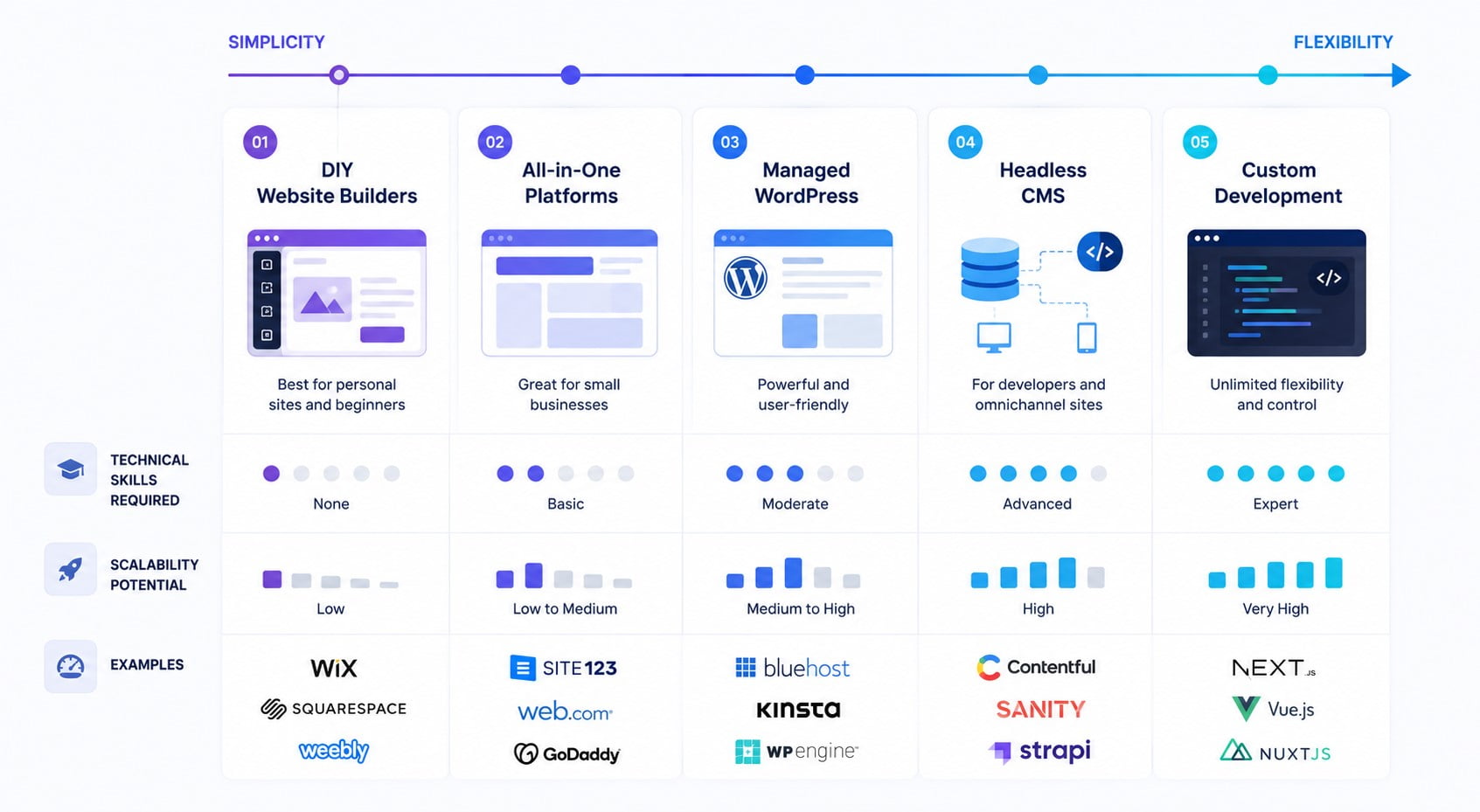
Website builders fall into several categories, each designed for different business goals, technical abilities, and growth plans. Choosing the right category is often more important than choosing a specific brand because platform architecture determines what your website can support in the future. Successful website builder selection starts by understanding these differences before comparing features or pricing.
| Website Builder Type | Best For | Main Limitation |
| Drag-and-drop builders | Small business websites, portfolios, local services | Limited flexibility for advanced customization |
| AI website builders | Fast launches and simple informational websites | Generated layouts often require manual refinement |
| Ecommerce builders | Online stores with inventory management | Less suitable for content-heavy websites |
| CMS platforms | Content-rich websites and long-term growth | Higher learning curve and maintenance |
| No-code visual builders | Businesses needing design flexibility without coding | Advanced functionality may require third-party integrations |
Every category solves a different problem. Compare platforms against future complexity, not only launch requirements.
Drag-and-Drop Website Builders
Drag-and-drop builders support fast launches but may restrict advanced integrations and custom workflows. They may become restrictive as requirements expand. Advanced integrations, custom workflows, and unique layouts are sometimes difficult to implement without changing platforms later.
AI Website Builders
AI website builders generate initial layouts and content from user prompts. They suit fast informational launches, but distinctive branding and complex journeys still require manual refinement.
Ecommerce Website Builders
Ecommerce builders combine product management, payments, and order operations within one platform. They suit active online retailers, while businesses selling occasionally may overpay for unused commerce features.
CMS-Based Solutions
CMS platforms provide deeper control over publishing, integrations, and functionality. They suit content-heavy or expanding websites but require greater responsibility for hosting, security, updates, and performance.
No-Code Visual Development Platforms
No-code website builders combine visual production with greater design control. Compare responsive tools, CMS support, SEO settings, and integrations because platform flexibility varies significantly.
How to Define Your Website Goals Before Choosing a Website Builder
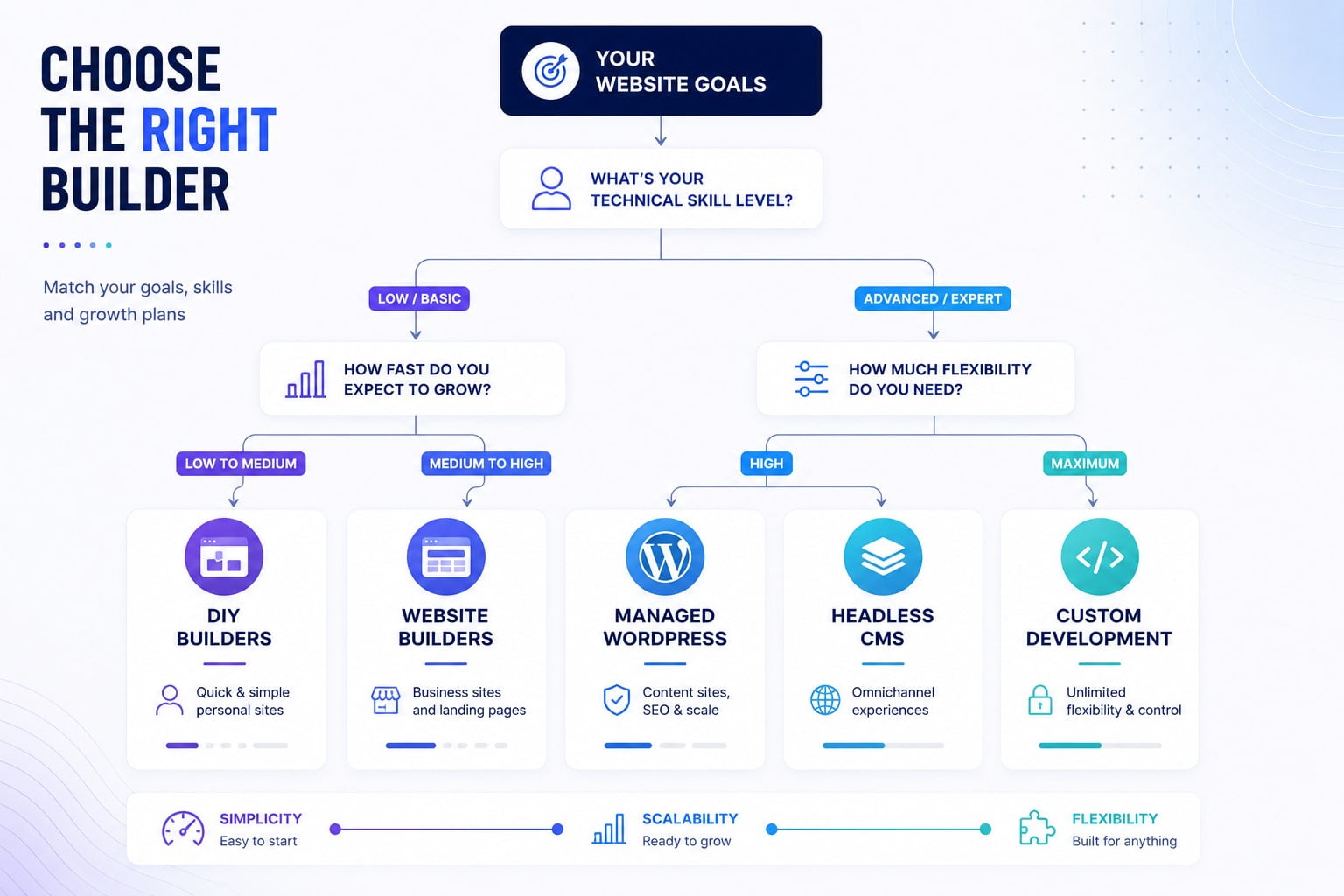
Choosing a platform without first defining your objectives often leads to unnecessary costs, limited flexibility, or an early migration. The first step in how to choose a website builder is identifying what the website should accomplish both today and as your business grows. Clear priorities make it easier to eliminate unsuitable platforms before comparing features or pricing.
Many businesses begin by exploring templates or AI tools because they appear to simplify the decision. In practice, those features matter only after the website’s purpose is established. A portfolio, online store, SaaS marketing website, and knowledge base all require different capabilities, even when they share a similar visual style.
Before evaluating any platform, define these priorities:
- Primary business objective.
- Expected website lifespan.
- Technical resources available.
- Estimated traffic growth.
- Required integrations.
- Available budget.
Start With Business Goals Instead of Features
Every website should solve a business problem before it introduces design or technology. Some organizations need to generate qualified leads, while others focus on selling products, publishing educational content, or supporting existing customers. Selecting features before defining those priorities often results in unnecessary complexity.
A useful way to evaluate builders is to compare business requirements against platform capabilities rather than marketing claims.
| Website Objective | Platform Priority | Less Important Feature |
| Lead generation | Forms, CRM integration | Large app marketplace |
| Ecommerce | Inventory and payments | Advanced blogging tools |
| Content marketing | CMS flexibility | Built-in booking tools |
| Portfolio | Design customization | Enterprise permissions |
| Membership website | User management | Extensive template library |
Consider Future Growth Before Launch
A website should support not only current minimum needs, but also future requirements. Limited platforms often force expensive redesigns or migrations.
Growth planning should answer several practical questions before development begins:
- Will the website expand into multiple languages?
- Could new products require Ecommerce functionality?
- Will additional team members manage content?
- Might customer portals or memberships become necessary?
- Will marketing require advanced analytics or automation?
These considerations improve website builder evaluation because they focus on future flexibility instead of current convenience.
Migration deserves particular attention. Moving hundreds of pages, rebuilding SEO settings, and preserving search rankings can require far more effort than investing additional time in selecting a website builder at the beginning of the project.
Balance Budget With Long-Term Value
Monthly subscription prices tell only part of the story. Businesses should compare the total cost of ownership, including premium templates, applications, transaction fees, custom domains, storage upgrades, and future development work. A platform with a lower monthly fee may become more expensive after essential functionality is added.
A higher-priced plan may be worth the investment when it provides:
- Built-in tools that replace several paid applications.
- Advanced permissions for growing content teams.
- Higher performance under increasing traffic.
- Priority support for business-critical websites.
- Features that eliminate future platform migrations.
Instead of asking which builder is cheapest, evaluate which option delivers the strongest long-term value for your business model. That approach encourages smarter investment decisions and reduces the likelihood of switching platforms later.
Evaluate Technical Resources Honestly
Technical experience should influence platform selection as much as business goals. Some builders are designed for independent users with no development experience, while others assume familiarity with content management systems, responsive layouts, or custom integrations.
A practical way to understand how to choose a website builder is to assess who will control everyday operations after launch:
- Define who can publish, edit, and approve content.
- Check whether user permissions match team responsibilities.
- Confirm how backups and version history are managed.
- Review export options before committing to the platform.
- Compare support availability for urgent technical issues.
- Test routine updates before purchasing a long-term plan.
Organizations should also consider who will maintain the website after launch. A platform that feels intuitive during setup may become difficult to manage if multiple contributors publish content or update products regularly. Ease of maintenance often has a greater impact on productivity than ease of initial setup.
Review the website design process before selecting a platform. This step reveals which tools can support your planned workflow.
Key Features to Look for in a Website Builder
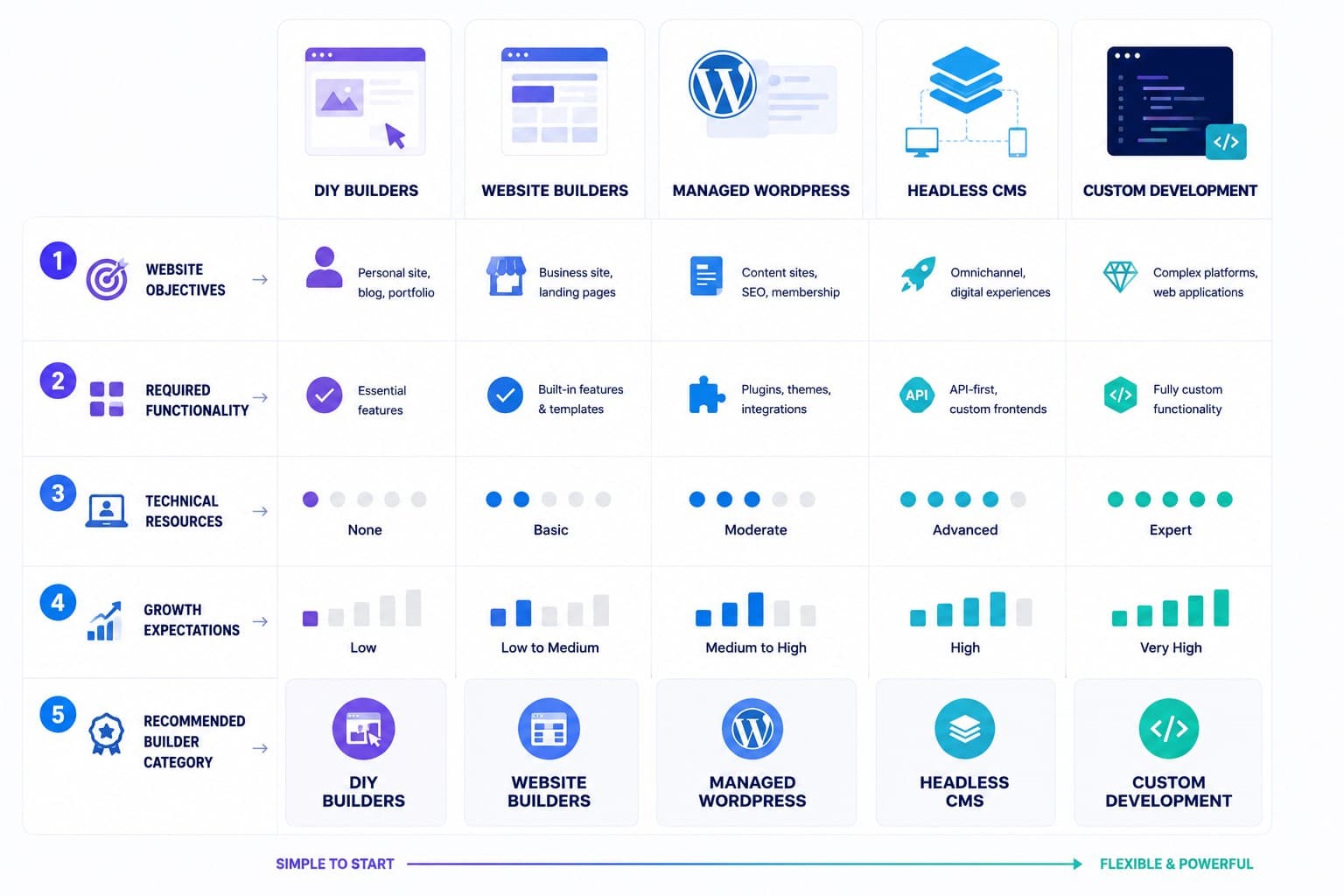
The right website builder should support your current requirements while leaving room for future growth. Evaluating features individually makes it easier to compare platforms objectively instead of relying on marketing claims. A structured website builder evaluation also helps distinguish essential capabilities from optional extras.
Before comparing specific tools, focus on the features that directly affect performance, usability, maintenance, and scalability.
| Feature | Why It Matters | Best For |
| Ease of use | Faster website management | Beginners and small teams |
| Design flexibility | Stronger branding | Businesses with custom visual identities |
| SEO tools | Better organic visibility | Content-driven websites |
| Ecommerce features | Online selling | Retailers and digital products |
| AI capabilities | Faster setup and content creation | Small businesses and startups |
| Platform flexibility | Supports long-term growth | Growing businesses |
Ease of Use and Technical Skill Requirements
Ease of use determines how efficiently a website can be built and maintained after launch. A platform should simplify routine tasks without limiting future improvements. The best choice depends on who will manage the website rather than on the number of available features.
When evaluating usability, consider these questions:
- Can non-technical employees update content?
- Does the editor support collaborative work?
- How long does onboarding typically take?
- Are common tasks completed without coding?
- Does the interface remain consistent across updates?
The interface should match the skills of its future owners.
Templates and Design Customization
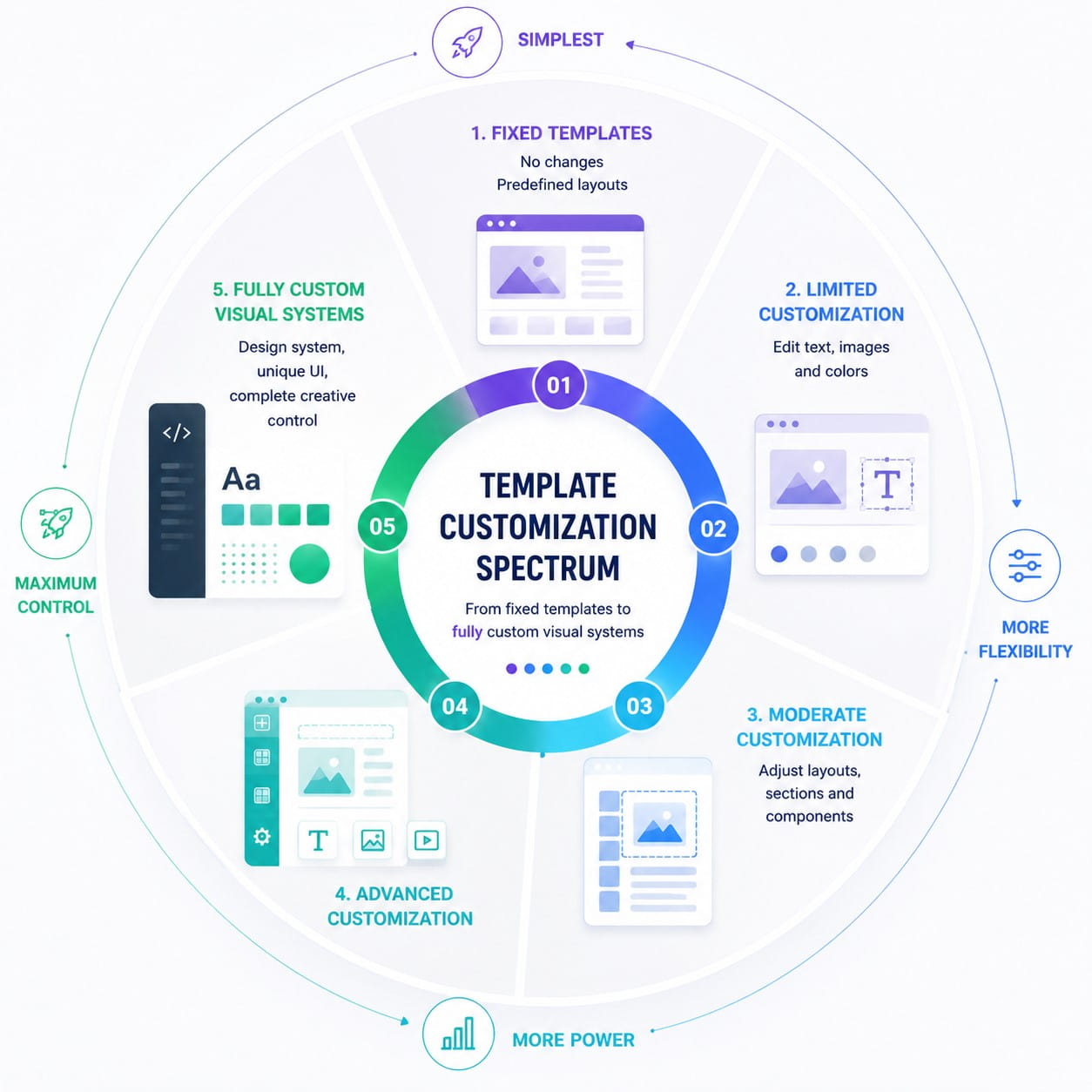
Some builders restrict customization to predefined sections, while others provide near-complete creative freedom. Greater flexibility usually requires additional learning, but it also prevents websites from looking identical to thousands of others using the same template.
Before selecting a platform, compare these customization options:
- Layout flexibility.
- Typography controls.
- Brand color management.
- Component libraries.
- Custom code support.
- Reusable design elements.
Businesses comparing custom website design vs templates should first define their required level of differentiation. Templates reduce launch time, while custom design provides greater control over branding, user experience, and future expansion.
Mobile Responsiveness
Mobile responsiveness is no longer an optional feature. Most visitors expect websites to load quickly and function consistently across smartphones, tablets, and desktop devices. A builder should automatically adapt layouts while still allowing manual adjustments when necessary.
Responsive design affects usability across different devices. web.dev’s Web Vitals guidance highlights responsiveness and visual stability as essential experience signals. Mobile previews help teams identify layout problems before publication.
Review these capabilities before making a decision:
- Automatic responsive layouts.
- Mobile preview mode.
- Device-specific adjustments.
- Responsive image optimization.
- Touch-friendly navigation.
SEO and Performance
SEO features should support both search visibility and long-term website maintenance. The most valuable tools include customizable URLs, meta titles, XML sitemaps, redirects, schema support, and image optimization. These capabilities make it easier for search engines to understand website structure while improving the overall user experience.
Performance deserves equal attention because page speed influences engagement and search rankings. Google Search Central recommends logical site architecture, descriptive URLs, and efficient page organization to help search engines understand content relationships.
Compare builders using these technical criteria:
| SEO Capability | Why It Matters |
| Custom URLs | Improves relevance and readability |
| Meta tags | Supports search optimization |
| XML sitemap | Helps search engines discover pages |
| Redirect management | Preserves SEO during updates |
| Schema support | Improves search result presentation |
| Image optimization | Reduces loading times |
Ecommerce Features
Not every website requires Ecommerce functionality. Businesses selling services or collecting leads often benefit more from streamlined navigation than advanced product management tools. Selecting unnecessary Ecommerce features can increase costs without improving business results.
Companies planning to sell products should evaluate how the builder manages inventory, payments, shipping, taxes, and promotional campaigns. The platform should also support future product expansion without requiring a complete migration.
Important built-in tools include:
- Product catalog management.
- Secure payment gateways.
- Inventory tracking.
- Shipping configuration.
- Tax calculation.
- Discount management.
Integrations and AI Tools
Third-party integrations connect the builder with essential business systems and reduce manual data entry. Modern builders also compete through their AI capabilities.
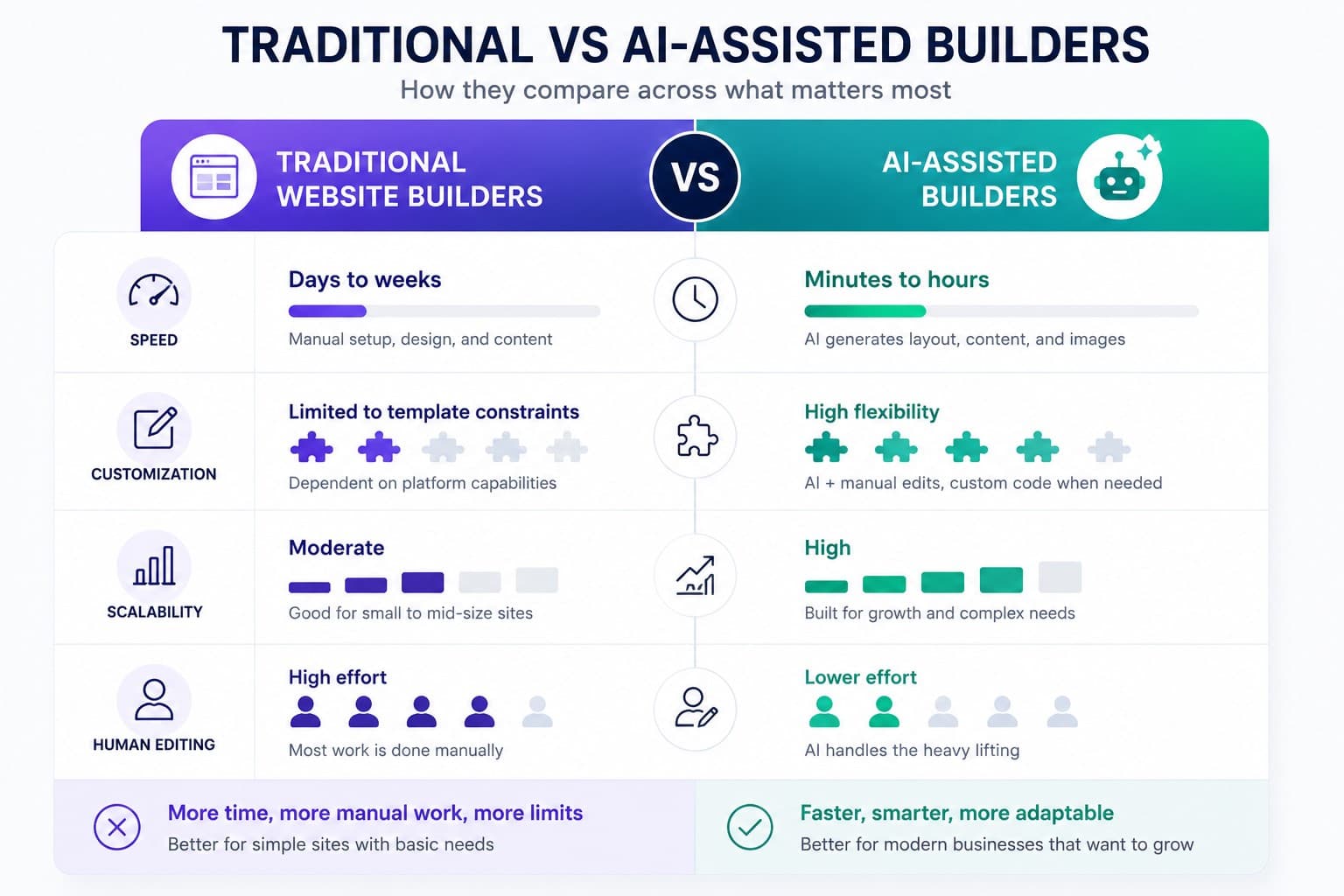
AI can generate layouts, write initial content, recommend images, or automate repetitive design tasks. These features accelerate production, but they still require human review to ensure accuracy, consistency, and brand alignment.
When comparing integrations, evaluate:
- CRM compatibility.
- Analytics connections.
- Email marketing platforms.
- Automation tools.
- Social media integrations.
- AI-assisted workflows.
Businesses exploring automated platforms should compare how much control remains after generation.
Pricing, Hidden Costs, and Plan Limitations
Pricing comparisons should include more than monthly subscription fees. Many website builders advertise attractive entry-level plans while placing essential functionality behind higher tiers. Understanding the total cost of ownership produces a more accurate website builder comparison than comparing introductory prices alone.
| Cost Category | Common Limitation | Questions to Ask |
| Free plan | Branding and limited features | Can the website launch professionally? |
| Custom domain | Often unavailable | Is domain connection included? |
| Premium templates | Additional purchase | Are premium designs necessary? |
| Ecommerce | Transaction or platform fees | What are the total selling costs? |
| Storage and bandwidth | Plan limits | Will upgrades become necessary? |
| Apps and integrations | Subscription charges | Which features require paid add-ons? |
Book a Call
Scalability for Future Growth
Scalability determines whether a website builder can continue supporting the business as traffic, content, products, and marketing activities expand. Choosing a platform that meets only today’s requirements often creates unnecessary migration projects later. Strong platform flexibility allows businesses to introduce new functionality without rebuilding the entire website.
Evaluate scalability using these criteria:
- Ability to support growing traffic.
- Flexible content management.
- Expansion of product catalogs.
- Advanced integrations.
- Multi-user collaboration.
- Upgrade paths without rebuilding.
Long-term success depends less on the platform’s current feature list than on its ability to adapt as business priorities change. This perspective makes how to choose the right website builder a strategic decision rather than a purely technical one.
Watch for These Warning Signs Before Making a Decision
Even well-reviewed platforms are not the right choice for every business. Comparing features is important, but recognizing potential limitations before committing to a builder can prevent expensive migrations later. If several of the following issues apply, continue evaluating other options before making a final decision.
- Essential SEO settings require higher pricing tiers.
- Important integrations depend on paid third-party apps.
- Templates cannot be customized beyond basic styling.
- Exporting content to another platform is difficult.
- Ecommerce functionality exceeds your actual business needs.
- The platform cannot support projected traffic growth.
Choosing a builder is often easier when you eliminate unsuitable options before selecting a preferred one. This approach reduces implementation risks while improving long-term flexibility.
Questions to Ask Before Making Your Final Choice
Before purchasing a subscription, verify that the builder supports both current and future business requirements. Asking a few practical questions often reveals limitations that feature comparison tables cannot show.
- Can the platform grow without a complete redesign?
- Does it support future marketing initiatives?
- Will another team member manage the website?
- Are additional costs predictable?
- Can important data be exported if necessary?
Answering these questions creates a more confident decision than comparing template galleries alone.
Conclusion
Choosing a website builder starts with understanding your business goals rather than comparing templates or pricing. The strongest decisions balance usability, design flexibility, performance, scalability, and future business requirements. A platform that supports long-term growth will usually deliver greater value than one that simply offers the fastest setup.
Taking time to evaluate key factors to consider when choosing a website builder helps reduce future migration costs and unnecessary redesigns. When the platform matches your website objectives, maintaining and expanding your website becomes significantly easier as your business evolves.